Infrastructure as a code
Infrastructure as Code it is the process of managing infrastructure in a file or files rather than manually configuring resources in a user interface. A resource in this instance is any piece of infrastructure in a given environment, such as a virtual machine, security group, network interface, etc.
Terraform is a tool for building, changing, and versioning infrastructure safely and efficiently. Terraform can manage existing and popular service providers as well as custom in-house solutions.
Configuration files describe to Terraform the components needed to run a single application or your entire datacenter. Terraform generates an execution plan describing what it will do to reach the desired state, and then executes it to build the described infrastructure. As the configuration changes, Terraform is able to determine what changed and create incremental execution plans which can be applied.
The infrastructure Terraform can manage includes low-level components such as compute instances, storage, and networking, as well as high-level components such as DNS entries, SaaS features, etc.
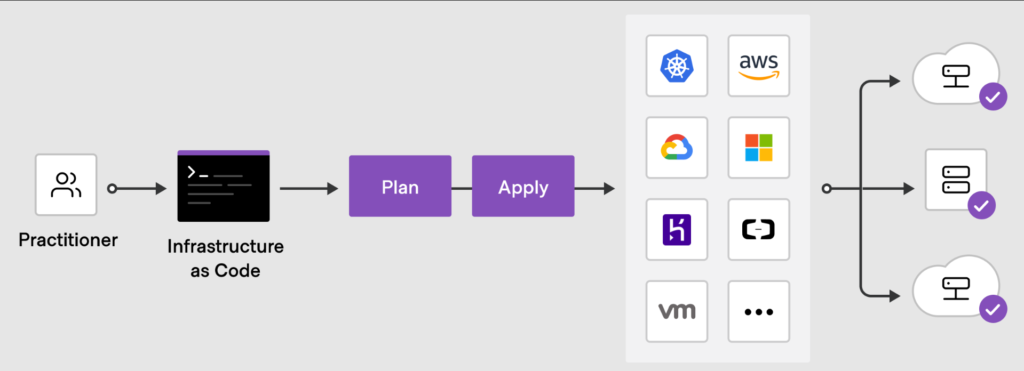
TERRAFORM INIT
The terraform init command is used to initialize a working directory containing Terraform configuration files. It is safe to run this command multiple times, , this command will never delete your existing configuration or state. During init, the root configuration directory is consulted for backend configuration and the chosen backend is initialized using the given configuration settings.
Link: https://www.terraform.io/docs/commands/init.html
TERRAFORM VALIDATE
The terraform validate command validates the configuration files in a directory, referring only to the configuration and not accessing any remote services such as remote state, provider APIs, etc.
Validate runs checks that verify whether a configuration is syntactically valid and internally consistent, regardless of any provided variables or existing state.
It is thus primarily useful for general verification of reusable modules, including correctness of attribute names and value types.
It is safe to run this command automatically, for example as a post-save check in a text editor or as a test step for a re-usable module in a CI system.
Note: Validation requires an initialized working directory with any referenced plugins and modules installed.
TERRAFORM PLAN
The terraform plan command is used to create an execution plan. Terraform performs a refresh, unless explicitly disabled, and then determines what actions are necessary to achieve the desired state specified in the configuration files.
TERRAFORM APPLY
The terraform apply command is used to apply the changes required to reach the desired state of the configuration, or the pre-determined set of actions generated by a terraform plan execution plan.
TERRAFORM DESTROY
The terraform destroy command is used to destroy the Terraform-managed infrastructure.
Subcommands:
FMT
The terraform fmt command is used to rewrite Terraform configuration files to a canonical format and style. The canonical format may change in minor ways between Terraform versions, so after upgrading Terraform it is recommended to proactively run fmt
TAINT
The terraform taint command manually marks a Terraform-managed resource as tainted, forcing it to be destroyed and recreated on the next apply. Taint force the recreation. This command will not modify infrastructure, but does modify the state file in order to mark a resource as tainted. Once a resource is marked as tainted, the next plan will show that the resource will be destroyed and recreated and the next apply will implement this change.
Forcing the recreation of a resource is useful when you want a certain side effect of recreation that is not visible in the attributes of a resource. For example: re-running provisioners will cause the node to be different or rebooting the machine from a base image will cause new startup scripts to run.
Example:
$ terraform taint aws_vpc.myvpc
The resource aws_vpc.myvpc in the module root has been marked as tainted.
Another example if we want taint the resource “aws_instance” “baz” resource that lives in module bar which lives in module foo.
terraform taint module.foo.module.bar.aws_instance.baz
Link: https://www.terraform.io/docs/internals/resource-addressing.html
UNTAINT
The terraform untaint command manually unmark a Terraform-managed resource as tainted, restoring it as the primary instance in the state.
Note: This command will not modify infrastructure, but does modify the state file in order to unmark a resource as tainted.
$ terraform untaint aws_vpc.myvpc
Resource aws_vpc.myvpc2 has been successfully untainted.
IMPORT
The terraform import command is used to import existing resources into Terraform.
Import will find the existing resource from ID and import it into your Terraform state at the given ADDRESS.
ADDRESS must be a valid resource address. Because any resource address is valid, the import command can import resources into modules as well directly into the root of your state.
ID is dependent on the resource type being imported. For example, for AWS instances it is the instance ID (i-abcd1234) but for AWS Route53 zones it is the zone ID (Z12ABC4UGMOZ2N).
Usage: terraform import [options] ADDRESS ID
Example:
$ terraform import aws_vpc.vpcimport vpc-06f0e46d612
Note: terraform import command can import resources directly into modules
Link: https://www.terraform.io/docs/commands/import.html
SHOW
The terraform show command is used to provide human-readable output from a state or plan file. This can be used to inspect a plan to ensure that the planned operations are expected, or to inspect the current state as Terraform sees it.
Usage: terraform show [options] [path]
You may use show with a path to either a Terraform state file or plan file. If no path is specified, the current state will be shown.
====================================================================
- Local Variables –
locals {
instance_type = “t2.micro”
}
resource “aws_instance” “example” {
instance_type = local.instance_type
# Rest of config
}
====================================================================
Input Variables –
- String Variables –
String variables are used to represent text values.
variable “instance_type” {
type = string
default = “t2.micro”
}
resource “aws_instance” “example” {
instance_type = var.instance_type
# Rest of config
}
====================================================================
- Number Variables
Number variables are used to represent numerical values.
variable “instance_count” {
type = number
default = 5
}
resource “aws_instance” “example” {
count = var.instance_count
# Rest of config
}
====================================================================
- List Variables –
List Variables represent a list sequence of values of a particular type and are used to create multiple resources or provide numerous arguments for a resource.
variable “subnet_ids” {
type = list(string)
default = [“subnet-abcde012”, “subnet-bcde012a”, “subnet-fghi345a”]
}
resource “aws_instance” “example” {
count = length(var.subnet_ids)
subnet_id = var.subnet_ids[count.index]
# Rest of code
}
====================================================================
- Map Variables-
can create a collection of key-value pairs. They are used to dynamically set arguments based on a specific key.
variable “tag_values” {
description = “Map of tags to assign to the resources”
type = map(string)
default = {
Environment = “Development”
Team = “DevOps”
batch = “25”
Class = “Young minds”
}
}
resource “aws_instance” “example” {
ami = “ami-0c94855ba95c574c8”
instance_type = “t2.micro”
tags = var.tag_values
}
====================================================================
Meta Arguments –
Meta arguments in terraform are special arguments that can be used with resource block
and modules to control their behavior or influence in the infra provisioning process.
- depends_on
Allows you to define explicit dependencies between resources. it takes a list of resource
dependencies, and terraform ensures that resources are created or destroyed in the correct
order based on dependencies.
ex
resource “aws_instance” “webserver” {
# info
depends_on = [aws_security_group.web.sg]
}
- count –
Allows you to create multiple instances of resources based on a count value. It is useful
when you want to create multiple similar resources without duplicating the configuration
block.
ex.
resource “aws_instance” “web”{
count = 3
#configuration
}
- provider
AWS –
provider “aws” {
region = “us-east-1”
}
Azure –
provider “azurerm” {
features {}
}
- for_each
Help in creating multiple instances of defined configuration. It also provides us with the
flexibility of dynamically setting the attributes for each resource.
locals {
ec2 = {
“vm1” = { instance_type = “t2.micro”, ami_id = “ami-0c7217cdde317cfec”, name = “My-EC2-1”},
“vm2” = { instance_type = “t2.small”, ami_id = “ami-079db87dc4c10ac91”, name = “My-EC2-2” },
“vm3” = { instance_type = “t2.medium”, ami_id = “ami-0c7217cdde317cfec”, name = “My-EC2-3”}
}
}
resource “aws_instance” “my_ec2” {
for_each = local.ec2
instance_type = each.value.instance_type
ami = each.value.ami_id
tags = {
name= “Instance-$(each.value.name)”
}
}
