When you’re using Amazon EC2 to run your business applications, those applications need access to CPU, memory, network, and storage. EC2 instances give you access to all those different components, and right now, let’s focus on the storage access. As applications run, they will oftentimes need access to block-level storage.
You can think of block-level storage as a place to store files. A file being a series of bytes that are stored in blocks on disc. When a file is updated, the whole series of blocks aren’t all overwritten. Instead, it updates just the pieces that change. This makes it an efficient storage type when working with applications like databases, enterprise software, or file systems.
When you use your laptop or personal computer, you are accessing block-level storage. All block-level storage is in this case is your hard drive. EC2 instances have hard drives as well. And there are a few different types.
When you launch an EC2 instance, depending on the type of the EC2 instance you launched, it might provide you with local storage called instance store volumes. These volumes are physically attached to the host, your EC2 instances running on top of. And you can write to it just like a normal hard drive. The catch here is that since this volume is attached to the underlying physical host, if you stop or terminate your EC2 instance, all data written to the instance store volume will be deleted. The reason for this, is that if you start your instance from a stop state, it’s likely that EC2 instance will start up on another host. A host where that volume does not exist. Remember EC2 instances are virtual machines, and therefore the underlying host can change between stopping and starting an instance.
Because of this ephemeral or temporary nature of instance store volumes, they are useful in situations where you can lose the data being written to the drive. Such as temporary files, scratch data, and data that can be easily recreated without consequence.
All right, I’m telling you not to write important data to the drives that come with EC2 instances. I’m sure that sounds a bit scary because obviously you’ll need a place to write data that persists outside of the life cycle of an EC2 instance. You don’t want your entire database getting deleted every time you stop an EC2 instance. Don’t worry, this is where a service called Amazon Elastic Block Store, or EBS, comes into play.
With EBS, you can create virtual hard drives, that we call EBS volumes, that you can attach to your EC2 instances. These are separate drives from the local instance store volumes, and they aren’t tied directly to the host that your EC2 is running on. This means, that the data that you write to an EBS volume can persists between stops and starts of an EC2 instance.
EBS volumes come in all different sizes and types. How this works, is you define the size, type and configurations of the volume you need. Provision the volume, and then attach it to your EC2 instance. From there, you can configure your application to write to the volume and you’re good to go. If you stop and then start the EC2 instance, the data in the volume remains.
Since the use case for EBS volumes is to have a hard drive that is persistent, that your applications can write to, it’s probably important that you back that data up. EBS allows you to take incremental backups of your data called snapshots. It’s very important that you take regular snapshots of your EBS volumes This way, if a drive ever becomes corrupted, you haven’t lost your data. And you can restore that data from a snapshot.

EBS is a service that provides block-level storage volumes that you can use with Amazon EC2 instances. If you stop or terminate an Amazon EC2 instance, all the data on the attached EBS volume remains available.
To create an EBS volume, you define the configuration (such as volume size and type) and provision it. After you create an EBS volume, it can attach to an Amazon EC2 instance.
Because EBS volumes are for data that needs to persist, it’s important to back up the data. You can take incremental backups of EBS volumes by creating Amazon EBS snapshots.
- We cannot launch any instance without any disk, by default there is a disk attached for the root or primary partition.
- There are various types of volumes available.
- A IMP thing regarding volume is, volume can only be attached to a machine which is in the same AZ.
EBS Snapshots:
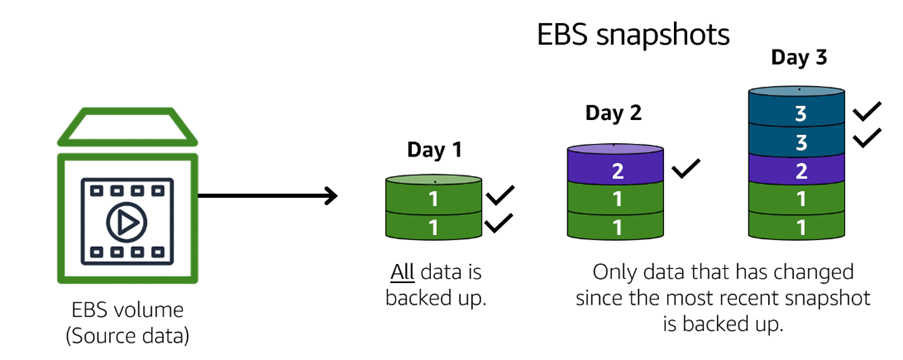
- An EBS snapshot is an incremental backup. This means that the first backup taken of a volume copies all the data. For subsequent backups, only the blocks of data that have changed since the most recent snapshot are saved.
- These snapshots are also stored in Amazon S3.
- Incremental backups are different from full backups, in which all the data in a storage volume copies each time a backup occurs. The full backup includes data that has not changed since the most recent backup.
- These snapshots are the exact replica of the EBS Volume.
- Take up less space as stored incrementally.
- Low cost as it is stored in S3 which is cheaper storage in AWS.
- Full Data recovery guaranteed.
- The 1st snapshot will have the written blocks and the next snapshots will have the change blocks, hence we don’t need to have the change blocks. Hence we don’t need to have multiple full copies of the snapshots.
- Deleting the snapshot will only remove the data which is exclusive to the snapshot.
Types of volumes-
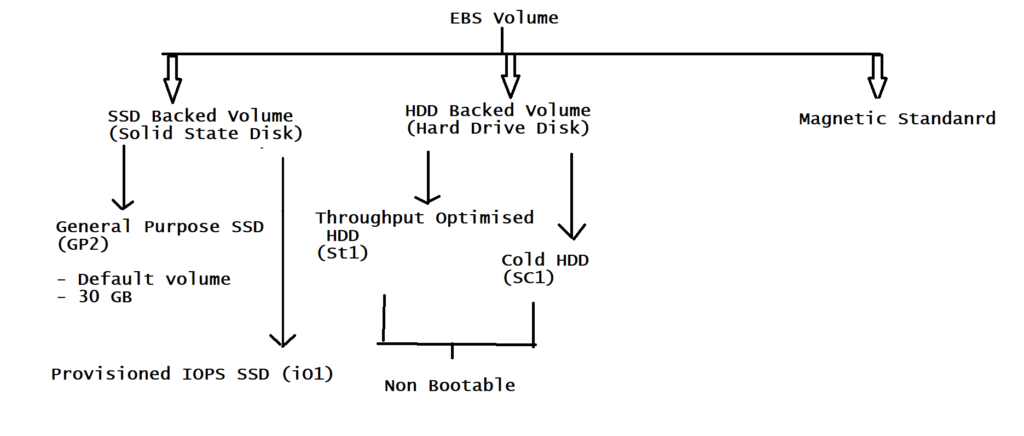
- General purpose SSD (gp2) :-
1. Basic speed of disk.
2. GP2 is default EBS Volume type for Amazon EC2 instance.
3. Backed by SSDs.
4. General Purpose balances both, Price and performance.
5. Ratio of 3IOPS/GB with upto 10,000 IOPS.
6. Boot Volume having low latency.
7. Volume size – 1GB to 16 TB
8. Price : $0.10/GB/month - Provisioned IOPS (IO1) :-
1. The IOPS offered is more. Here IOPS means input output per second. This means the input output transaction speed of the disk is very high
2. These volumes are ideal for both Iops intensive and throughput intensive workloads that requires extremely low Latency, or for mission critical applications.
3. Designed for I/p-o/p intensive applications such as large relational or NoSQL Database.
4. Use if you need more than 10,000 IOPS.
5. Can provision up to 32000 IOPS per volume.
6. Volume Size 4 GB to 16 TB
7. Price: $0.125 / Gb/ Month
Practical Eg:- Database Disk.
- Throughput Optimized (St1):-
1. Number of Bytes/bits written in a particular second is called as through put, so the disks are more optimized for through put. (40MB/second written on disk)
2. It is backed by HDD and ideal for frequently accessed throughput intensive large datasets.
3. These volumes deliver performance in terms of throughput, measured in Mbps.
4. Big Data, Data Warehouse, log processing
5. It is Non Bootable.
6. Can be provisioned up to 500 IOPS per volume
7. Volume Size 500 GB to 16 TB
8. Price: $0.045 / Gb/ Month
- Cold HDD–
1. Fixed Speed offered. Practically used for backup purpose.
2. This volume is also backed by HDD, and provides lowest cost per GB, of all EBS Volume types.
3. Lowest Cost storage for infrequent access Workloads.
4. Used in file servers.
5. It is Non Bootable.
6. Can be provisioned upto 250 IOPS per volume.
7. Volume Size 500 GB to 16 TB
8. Price: $0.025 / Gb/ Month - Magnetic Standard –
1. This is very old generation, used for back up purpose.
2. Lowest cost per GB of all Bootable EBS Volume types.
3. Ideal for workloads where data is accessed infrequesntly.
4. Volume Size: 1 GB to 1 TB
5. Price: $0.05 / Gb/ Month
6. Can be provisioned upto 40 – 200 IOPS per volume.
Advantages-
- Low Latency
- High Performance
- It’s a bootable drive
- Highly redundant (data recovery is fast)
