Need Of Configuration Management
- DevOps includes coding, building, testing, packaging, release, configuration, and monitoring.
- Configuration management is important in DevOps because it helps you automate otherwise tedious tasks and allows an organization to increase agility.
Configuration Management
- In software development circles, configuration management refers to the process by which all environments hosting software are configured and maintained.
- Every development pipeline requires multiple environments for multiple purposes – unit testing, integration testing, acceptance testing, load testing, system testing, end-user testing, etc.
- These environments become increasingly complex as the testing moves towards pre-prod and prod environments.
- Configuration management is an automated process that ensures the configuration of these environments is optimal.
Advantages of Configuration Management Tool
- Increased efficiency with a defined configuration process that provides control and improves visibility with tracking.
- Cost reduction by having detailed knowledge of all the elements of the configuration which allows for unnecessary duplication to be avoided.
- Your business will have greater agility and faster problem resolution, giving a better quality of service for your customers.
- Enhanced system and process reliability through more rapid detection and correction of improper configurations that could negatively impact performance.
- The ability to define and enforce formal policies and procedures that can help with process status monitoring and auditing.
- More efficient change management that reduces the risk of product incompatibility or problems.
- Faster restoration of your service if a process failure occurs. If you know the required state of the configuration then recovering the working configuration will be much quicker and easier.
There are two methods of Configuration Management (CM):
- PULL BASED CM: Nodes initiate the communication to the CM Server
- PUSH BASED CM: CM server will initiate the communication to the nodes.
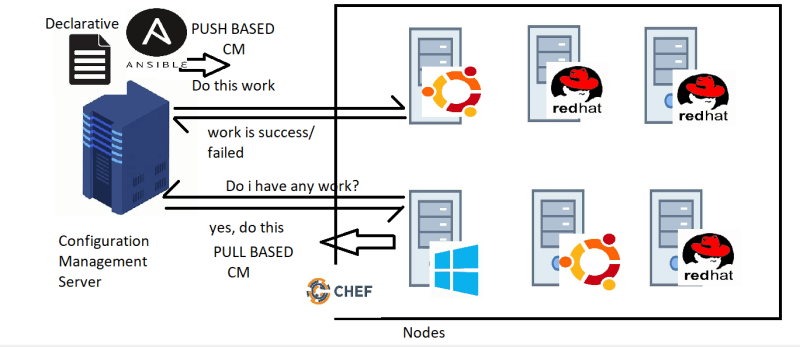
PULL BASED CM
- In PULL BASED CM, An agent is installed on every node which is responsible for initiating the communication and following instructions from CM Server
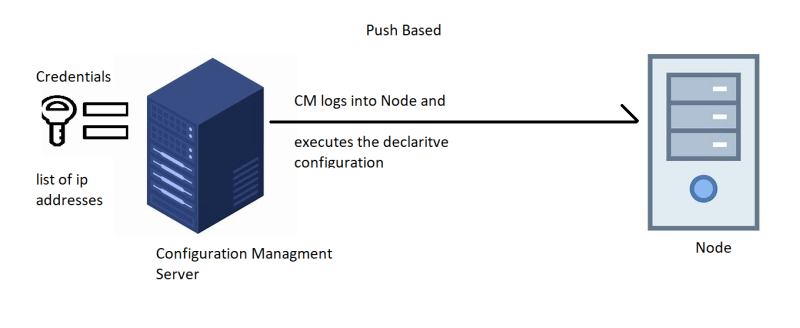
PUSH BASED CM
- In PUSH BASED CM, CM Server has admin credentials of the node and the details like ip address/hostname to login and execute the declarative configuration
Ansible
- Ansible is an open source IT automation engine that automates provisioning, configuration management, application deployment, orchestration, and many other IT processes.
- Ansible is a push based CM.
- Ansible maintains the list of nodes to be communicated and is referred as inventory.
- To write the declarative configuration, Ansible used YAML and calls it as Playbook.
- Ansible is a software tool that provides simple but powerful automation for cross-platform computer support.
- Ansible requirements:
- Configuration Management Server in the case of ansible can be very light weight machine.
- Ansible logs in to the nodes and executes the declarative configuration & for that it requires python to be installed on the node.
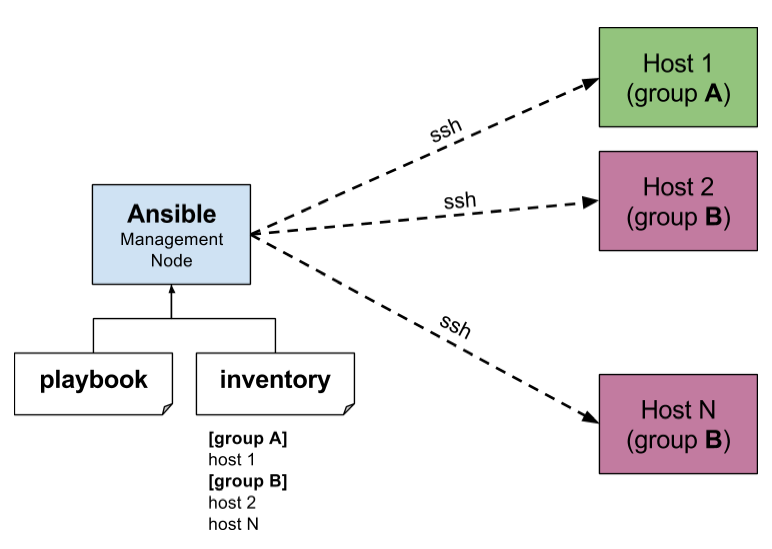
Inventory files
- Ansible has a default inventory file created when the ansible is installed.
- When ansible is installed in /etc/ansible/ansible.cfg a default configuration for ansible is created.
- Inventory file – /etc/ansible/hosts
- Inventory file can have groups. An entry can be duplicate in many groups.
- The ideal way of dealing with inventory files is to create a inventory file with the name of the environment and ensure the groups names are consistent across different inventories
- systemtest_hosts
- performancetests_hosts
- pre_prod_hosts
- prod_hosts
Ansible Master & Node setup:
Ad-Hoc commands, Modules and Playbooks
Ansible Modules
- Ansible with a number of modules (called module library) that can be executed directly on remote hosts or through playbooks
- Your library of modules can recite on any machine and there are no service Daemons or data bases required
Ad-Hoc commands
- Ad -Hoc commands are commands which can be Run individually to perform quick functions.
- Ad-hoc commands can-
- Can execute any ansible module
- Good for rare activities
- history cannot be maintained
- This ad hoc commands are not used for configuration management and deployment because there commands are of one time usage.
- The ansible ad hoc commands uses the user /bin /ansible command line tool to automate a single task.
- Adhoc command:
- ansible -m <module-name> -a <parameters/arguments> -i <inventory> all
- arguments:
- state argument: touch
- path: /tmp/1.txt
- ansible -m ansible.builtin.file -a ‘path=/tmp/1.txt state=touch’ all
To run reboot for all your company servers in a group, ‘abc’, in 12 parallel forks
$ Ansible abc -a “/sbin/reboot” -f 12
Transferring file to many servers/machines
$ Ansible abc -m copy -a “src = /etc/yum.conf dest = /tmp/yum.conf”
Creating new directory
$ Ansible abc -m file -a “dest = /path/user1/new mode = 777 owner = user1 group = user1 state = directory”
Deleting whole directory and files
$ Ansible abc -m file -a “dest = /path/user1/new state = absent”
Managing Packages-
$ Ansible abc -m yum -a “name = demo-tomcat-1 state = present”
$ Ansible abc -m yum -a “name = demo-tomcat-1 state = absent”
$ Ansible abc -m yum -a “name = demo-tomcat-1 state = latest”
Ansible Playbook, Variables, Handlers & Loops
YAML (Yet another Markup Language)
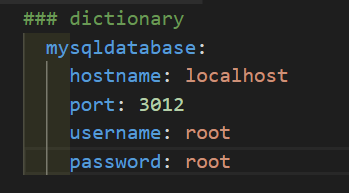
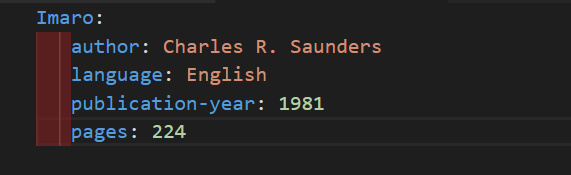
- For ansible nearly every YAML files starts with a list
- Each item in the list is list of key values pairs commonly called a dictionary
- All YAML files have to begins “—“with and ends with”—“
- All members of a list lines must begins with same indentation level starting with”-“
For eg :
- Playbook in ansible are written in YAML format
- It is human readable data serialization language it is commonly used for configuration files
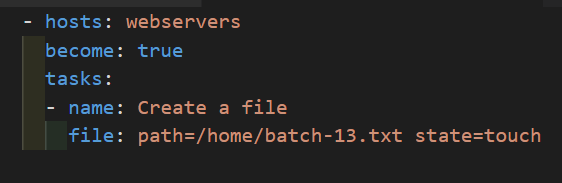
- Playbook is like a file where you write quotes consists of vars, tasks, handlers, files, templates and Roles
- Each Playbook is composed of one or more modules in a list module is a collection of configuration files
- Playbook are divided in to many sections like
* Target section defines the host against which playbooks task has to be executed
* Variable section define variables
* Task section- list of all modules that we need to run in an order
Example Playbook:
Variables
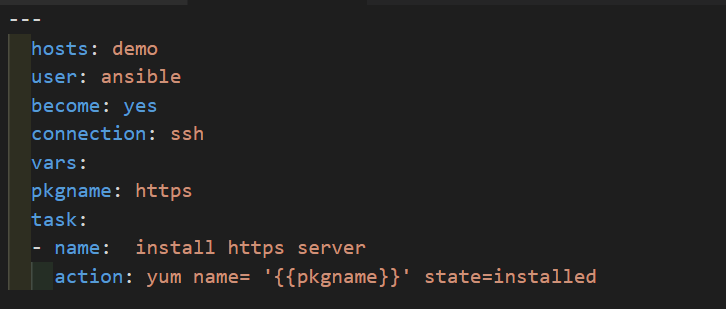
- Ansible uses variables which are define previously to enable more flexibility in playbooks and Roles then can be used to loop through a set of given values excess various information like the host name of a system and replace certain strings in templates with specific values.
- Put variable section about task so that we define it first and use it later.
- Now go to ansible server and create one Playbook

Handlers Section
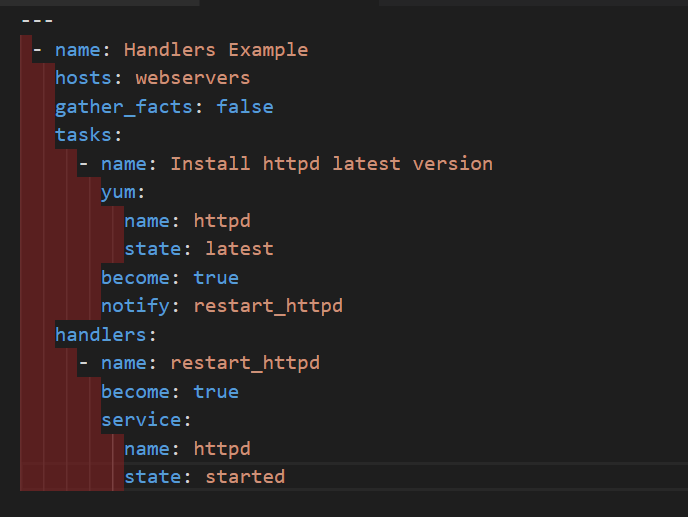
- A handler is exactly the same as a task but it will run when called by another task.
- OR
- Handlers are just like regular task is an ansible Playbook but our only Run if the task contains a notify directive and also indicates that it changed something.
Loops
- Sometimes you want to repeat a task multiple Times in computer programming this is called loops common & loops include changing ownership on several files and directories with the file module Creating multiple user with the user module and repeating a bowling step until certain result is reached.
Now go to ansible server
[server]# vi loops.yml

Conditions, Vaults and Roles in Ansible
Conditions
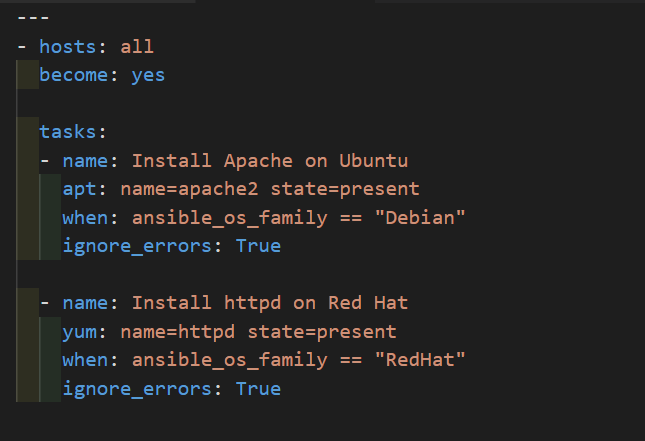
Whenever we have different scenarios we put conditions according to the scenario.
“When” statement?
Sometime you want to skip a particular command on a particular node
Vault
- Ansible allows keeping sensitive data such as password or keys in encrypted files, rather than a plaintext in your playbooks.
Creating a new encrypted Playbook
# ansible-vault create vault.yml // Enter the password
Edit the encrypted Playbook
# ansible-vault edit vault.yml
To change the password
# ansible-vault rekey vault.yml
To encrypt and existing playbook
# ansible-vault encrypt target.yml
To Decrypt an encrypt playbook
# ansible-vault decrypt target.yml
Ansible Roles-
- We can use to techniques for reusing a set of tasks includes and Roles.
- Roles provide a framework for fully independent or interdependent collections of files, tasks, templates, variables, and modules.
- The role is the primary mechanism for breaking a playbook into multiple files.
- This simplifies writing complex playbooks and makes them easier to reuse.
- Roles are good for organizing task and encapsulating data needed and accomplish those task.
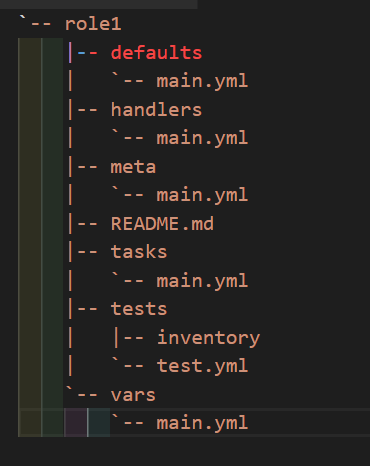
- We can organized play books into directory structure called roles
- Adding more and more functionality to the playbooks will make it difficult to maintain in the single file
Roles
- Default– it stores the data about role/ application default variables example if you want to run to port 80 or 8080 then variables needs to define in this path.
- Files– it contains files made to transferred to the remote VM (static files)
- Handlers– They are triggers or task we can segregate all the handlers required in Playbook.
- Meta– this directory content files that establish rolls dependencies example- author name, supported platform, dependencies if any.
- Task– it contains all the task that is normally in the Playbook for example- installing packages and copies files etc.
- Vars– Variables for the role can be specified in this directory and used in your configuration files both wars and Default stores variables.
Ansible Galaxy –
Ansible Galaxy is essentially a large public repository of Ansible roles. Roles ship with READMEs detailing the role’s use and available variables. Galaxy contains a large number of roles that are constantly evolving and increasing. Galaxy can use git to add other role sources, such as GitHub.
Ansible is an open-source configuration management tool while Ansible Galaxy is a repository for Ansible roles. Ansible Galaxy for Ansible is what PyPI is for Python, or what Maven is for Java.
Here are some helpful ansible-galaxy commands you might use from time to time:
ansible-galaxy list // displays a list of installed roles, with version numbers.
ansible-galaxy remove <role> // removes an installed role.
ansible-galaxy info // provides a variety of information about Ansible Galaxy.
ansible-galaxy init //can be used to create a role template suitable for submission to Ansible Galaxy.
To create an Ansible role using Ansible Galaxy, we need to use the ansible-galaxy command and its templates. Roles must be downloaded before they can be used in playbooks, and they are placed into the default directory /etc/ansible/roles. You can find role examples at https://galaxy.ansible.com/geerlingguy:
