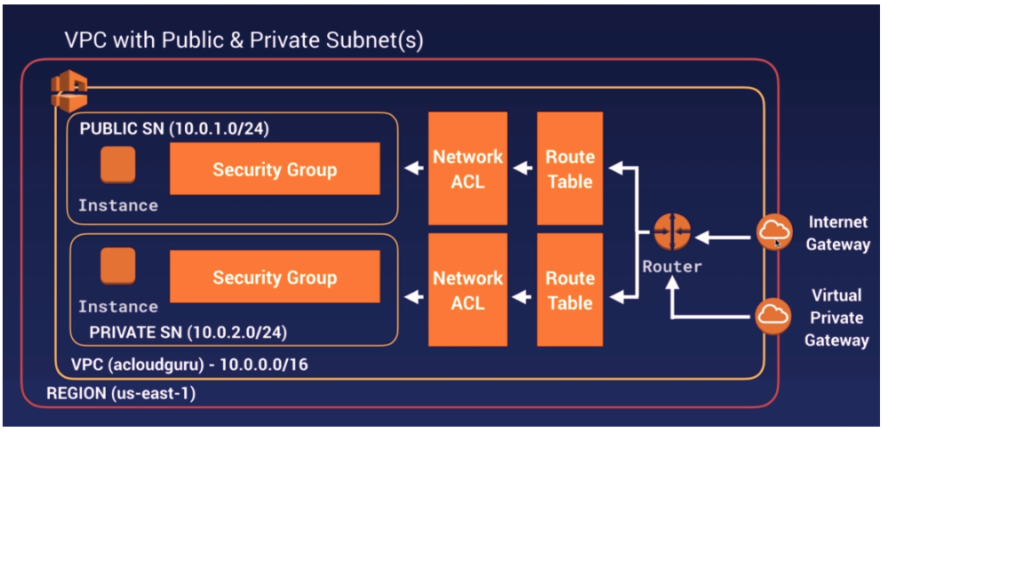
- VPC (Virtual Private Cloud) is a logical data center or virtual data center in Cloud. Its provide an isolated section to host your machine.
- VPC is a collection of the region, IG, route table, ACL, security group, subnet, instances. You can add all the security matrix-like security groups, etc.
- VPC provide us a completely separate environment where we can place our machine in our own way.
- It helps you to create a virtual isolated environment in the same cloud.
- Multiple virtual isolated Environments are also possible.
- Amazon Virtual Private Cloud is a commercial cloud computing service that provides users a virtual private cloud, “Provisioning a logically isolated section of Amazon Web Services Cloud”.
- AWS Virtual Private Cloud (VPC) gives you complete control over your virtual networking environment, including resource placement, connectivity, and security.
- We cannot establish the connection between two EC2 instances in two different VPC’s. It is possible only if they have public IP address
- In many case we would want connectivity b/w EC2 instances in different VPC’s but privately.
- AWS supports peering connection.
- When we create VPC in AWS , the allowed block size is between /16 and /28
- In the case of AWS VPC we cannot use 5 IP addresses in every subnet
- All 0’s is network IP (x.x.x.0)
- All 1’s is broad cast IP (x.x.x.255)
- x.x.x.1 (Reserved by AWS for VPC Router)
- x.x.x.2 Reserved by AWS for IP address of the DNS Server
- x.x.x.3 Reserved for future usage.
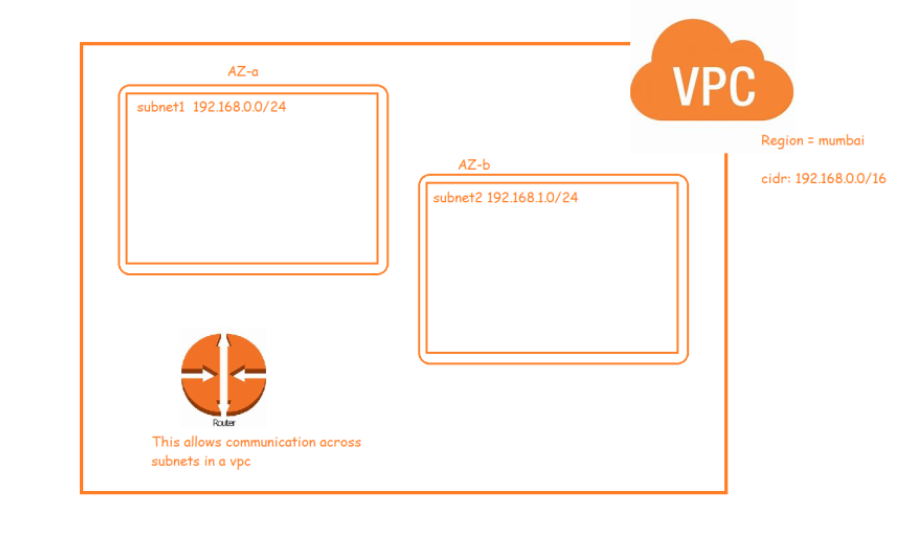
- To create a network in AWS, we use a service called as VPC (Virtual Private Cloud)
- Network is created at a region level
- Subnets are created at AZ level
Why do we need VPC ?
- You need a VPC: a virtual private network that keeps your servers safe from the ravages of the public internet.
- Multiple Connectivity Options:-
- Your AWS VPC can be connected to a variety of resources, such as the internet, your on-premise data center, other VPCs in your AWS account, or VPCs in other AWS accounts; once connected, you can make your resources accessible or inaccessible in your VPC from outside of your VPC based on your requirement.
- Secure
- Simple
- All the scalability and reliability of AWS is available.
Use Cases –
- Host a public facing website.
- Host a multi-tier application, such as it will have web-layer, LB layer, DB layer etc.
- Hosting of scalable web applications in your cloud.
- Manage multiple projects, create isolated networks for those projects.
Some IMP terms –
- VPC:- this is nothing but a full isolated network.
- Default VPC:- in every region there is a small default VPC created by amazon, this default VPC has all the standard routing rules set by amazon.
- Non Default VPC
- Subnets
- Internet gateway
- Network ACLs (Network Access Control List)
- Security Groups
- NAT Gateway/Instance.
- Routing Tables.
- IPs, DNS etc
- VPC peering
Default limits –
- We can have only up to 5 non-default AWS VPC’s per region
- You can create up to 200 subnets per VPC
- We can create up to 200 network ACL per amazon VPC
- We can have up to 5 Elastic IP addresses per AWS account per region.
- Count of IPv4 CIDR blocks / VPC – 5
- Count of IPv6 CIDR blocks / VPC – 1
- Count of Internet gateways / Region – 5
- Count of NAT gateways / Availability Zone – 5
Subnets –
- A subnet, or subnetwork, is a network inside a network.
- When we break down a network into smaller networks is called as subnet or subnetwork.
- This breaking down of network is based on IP. (CIDR)
- Basically there are 2 types of subnets
- Public Subnet
- Private Subnet
Route table –
- A route table contains a set of rules, called routes, that are used to determine where network traffic from your subnet or gateway is directed.
- To put it simply, a route table tells network packets which way they need to go to get to their destination.
- There are 2 types of routing Public routing and Private routing
- Public routing is where we can route to the internet with the help of internet gateway.
- Private routing means we can routing between private subnets or internal network only.
Internet Gateway –
- We created VPC because we want to run our resources in it.
- When we run our resources in VPC, we might need to access our resources (VM’s) from internet
- AWS VPC created by us is private in nature by default and cannot be accessed from internet.
- Internet Gateway (IGW) allows instances with public IPs to access the internet.
- To enable access to our VPC from/to internet, we need to Create an internet gateway.
- An internet gateway is a horizontally scaled, redundant, and highly available VPC component that allows communication between your VPC and the internet.
- You can associate exactly one Internet Gateway with a VPC.
- If a VPC does not have an Internet Gateway, then the resources in the VPC cannot be accessed from the Internet.
- A public subnet is a subnet that’s associated with a route table that has a route to an internet gateway.
- In simple terms this means, when a subnet is connected to internet its called as public subnet
- An internet gateway has a Public IP attached to it.
- There’s no additional charge for having an internet gateway in your account.
Nat Gateway vs Internet Gateway
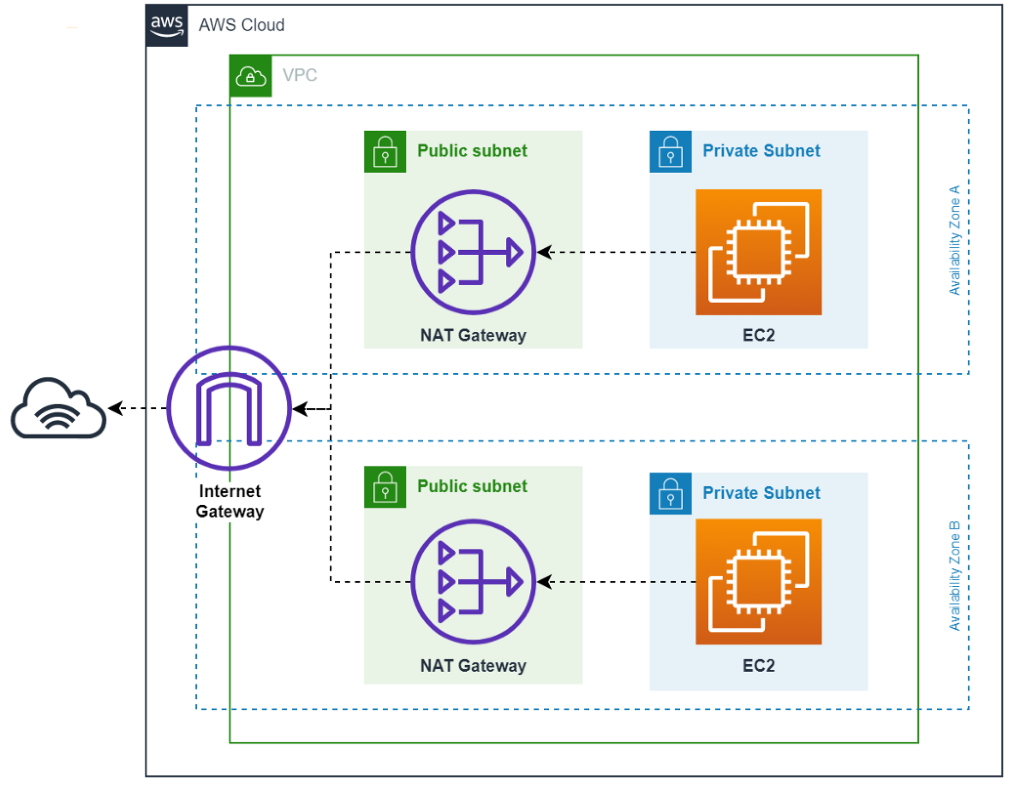
Nat Gateway –
- NAT is nothing but network address translation.
- NAT Gateway (NGW) allows instances with no public IPs to access the internet.
- It only works one way. Through NAT we can go from Private to Public but a public entity cannot access the private n/w.
- One way communication
- If we want two way NAT then we have to setup reverse NATing
- In cloud computing we do not go for reverse NATing which is a standard
- NAT gateways are supported for IPv4 or IPv6 traffic.
- NAT gateway supports the following protocols: TCP, UDP, and ICMP.
- Each NAT gateway is created in a specific Availability Zone and implemented with redundancy in that zone.
- You can associate exactly one Elastic IP address with a public NAT gateway.
- You are charged for each hour that your NAT gateway is available and each Gigabyte of data that it processes.
Security groups –
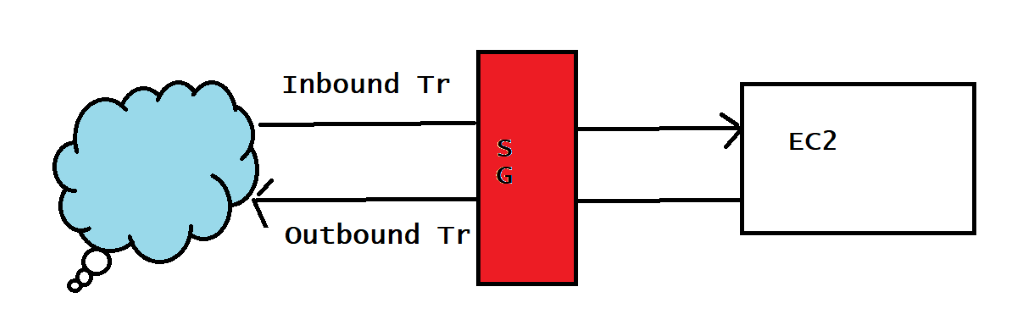
- An AWS security group acts as a virtual firewall for your EC2 instances to control incoming and outgoing traffic. Both inbound and outbound rules control the flow of traffic to and traffic from your instance, respectively.
- AWS Security Groups help you secure your cloud environment by controlling how traffic will be allowed into your EC2 machines. With Security Groups, you can ensure that all the traffic that flows at the instance level is only through your established ports and protocols.
Network ACL (access control list) –
- This acts as a firewall for associated subnets.
- It controls both incoming and outgoing traffic at the subnet level.
- It’s the 1st firewall at the network level.
- A network access control list (ACL) is an layer of security for your VPC that acts as a firewall for controlling traffic in and out of one or more subnets.
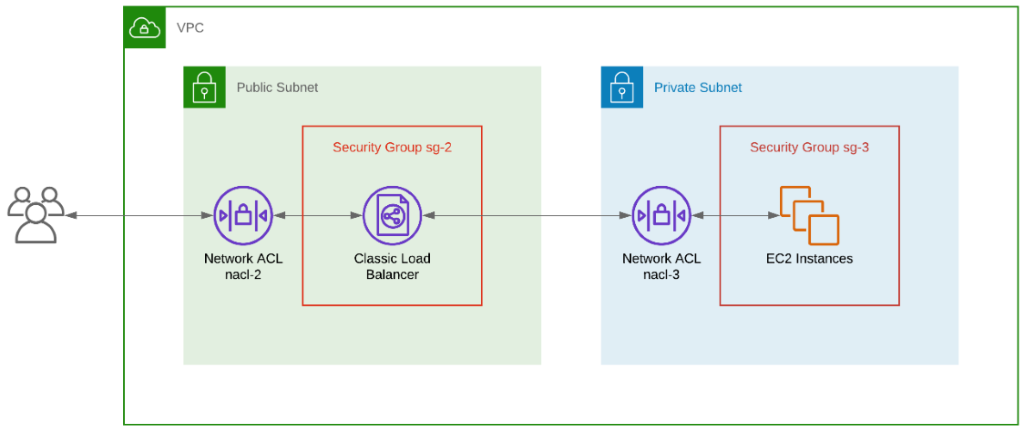
- A network access control list (ACL) is an optional layer of security for your VPC that acts as a firewall for controlling traffic in and out of one or more subnets.
The following are the parts of a network ACL rule:
- Rule number – Rules are evaluated starting with the lowest numbered rule. As soon as a rule matches traffic, it’s applied regardless of any higher-numbered rule that might contradict it.
- Type – The type of traffic; for example, SSH. You can also specify all traffic or a custom range.
- Protocol – You can specify any protocol that has a standard protocol number.
- Port range – The listening port or port range for the traffic. For example, 80 for HTTP traffic.
- Source – [Inbound rules only] The source of the traffic (CIDR range).
- Destination – [Outbound rules only] The destination for the traffic (CIDR range).
- Allow/Deny – Whether to allow or deny the specified traffic.
Security Groups VS Network ACL’s-
| Security Group | Network Access Control List |
| In security group, we operate at instance level. | In network ACL, we operate sub net level. |
| It support only allow rules. | It support allow rules and deny rules. |
| It is stateful, Return traffic is automatically allowed regardless of any rules. | It is stateless, it return traffic must be allowed explicitly. |
| We cannot block specific IP address using SGs. | We can block specific IP Address using NACL. |
| All rules are evaluated before deciding to permit traffic. | Rules are processed in number order when deciding whether allow traffic. |
| It start with instance launch configuration. | In which we assigned to subnet for all instance. |
| It applies when someone specifies security group when launching the instance and it associates with security group. | They do not depend on user it automatically apply all instances with subnet. |
VPC Peering-
- A VPC peering connection is a networking connection between two VPCs that enables you to route traffic between them using private IPv4 addresses or IPv6 addresses.
- VPC peering can be created b/w any two vpcs where cidr’s donot collide.
- Instances in either VPC can communicate with each other as if they are within the same network. You can create a VPC peering connection between your own VPCs, or with a VPC in another AWS account.
- The VPCs can be in different regions (also known as an inter-region VPC peering connection).
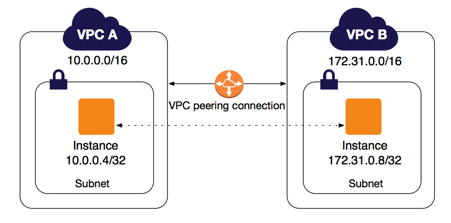
- AWS uses the existing infrastructure of a VPC to create a VPC peering connection; it is neither a gateway nor a VPN connection, and does not rely on a separate piece of physical hardware. There is no single point of failure for communication or a bandwidth bottleneck.
Multiple VPC peering connections-
- A VPC peering connection is a one to one relationship between two VPCs.
- You can create multiple VPC peering connections for each VPC that you own, but transitive peering relationships are not supported.
- You do not have any peering relationship with VPCs that your VPC is not directly peered with.

VPC connection-
- The owner of the requester VPC sends a request to the owner of the accepter VPC to create the VPC peering connection.
- The accepter VPC can be owned by you, or another AWS account, and cannot have a CIDR block that overlaps with the requester VPC’s CIDR block’s.
- The owner of the accepter VPC accepts the VPC peering connection request to activate the VPC peering connection.
- To enable the flow of traffic between the VPCs using private IP addresses, the owner of each VPC in the VPC peering connection must manually add a route to one or more of their VPC route tables that points to the IP address range of the other VPC (the peer VPC).