What is Scaling?
- In cloud computing, scaling is the process of adding or removing compute, storage, and network services to meet the demands a workload makes for resources in order to maintain availability and performance as utilization increases.
- In simple words, as per our requirement increasing the capacity of anything is called scalability.
- Auto-scaling is nothing but automatic scaling of our capacity as per the requirement.
- Here basically the concept is whenever the load on the server increases/decreases auto-scaling functionality helps to launch as well as terminate the EC2 instances.
- So here if you see scaling is done in both ways, we are increasing as well as decreasing the horizontal capacity.
- Scale OUT/UP means increasing the number of ec2 instances
- Scale IN/DOWN means decreasing the number of ec2 instances
- Auto-scaling is region specific, we cannot do auto-scaling between 2 regions.
- Auto Scaling (AS) happens in Availability zones and we can distribute the instances evenly in Availability zones.
- Here we create group of EC2 instances which can scale up and down as per the conditions we set.
- Auto scaling ensures that we have right number of EC2 instances to suffice our needs all the time, also autoscaling helps us reduce the cost by cutting down the number of instances when not needed.
- No extra cost is needed for Auto-Scaling, only cost of EC2 instances.
- Auto scaling makes sure that all the launches instances are balanced in between the set availability zones.
- Just incase these are not balanced or we later add the instances, auto scaling tries to balance it out automatically
- Here the criteria is we can only add a additional EC2 instance to the ASG group only if ec2 instance is in running state, it’s in the same AZ which is configured with ASG, and if the ASG has reached its max limit then we cannot add as the request fails.
1. Vertical Scaling
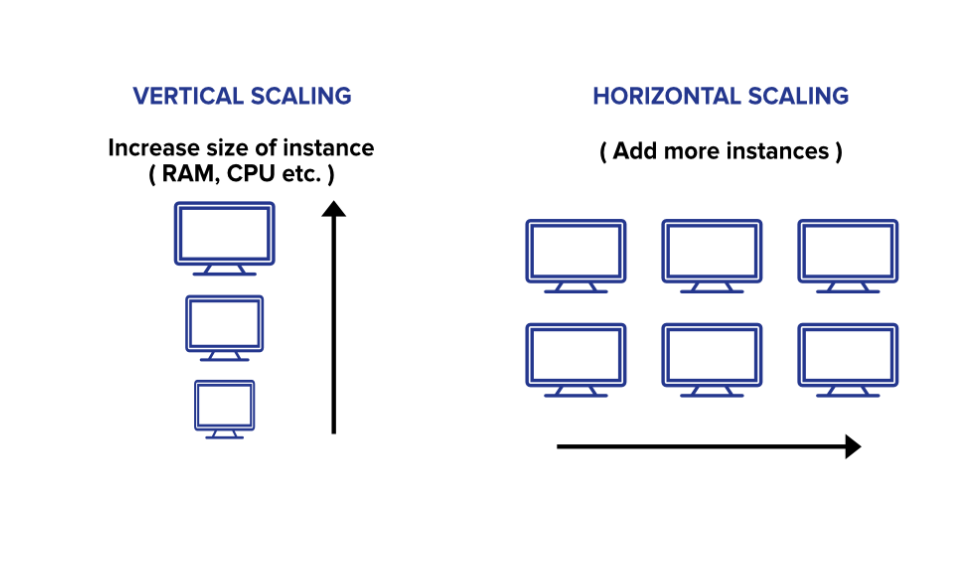
- In simple terms upgrading the capacity of a single machine or moving to a new machine with more power is called vertical scaling. You can add more powers to your machine by adding better processors, increasing RAM, or other power increasing adjustments. Vertical scaling can be easily achieved by switching from small to bigger machines but remember that this involves downtime. You can enhance the capability of your server without manipulating your code.
- This approach is also referred to as the ‘scale-up‘ approach.
- It doesn’t require any partitioning of data and all the traffic resides on a single node with more capacity.
- Easy implementation.
- Less administrative efforts as you need to manage just one system.
- Application compatibility is maintained.
- Mostly used in small and mid-sized companies.
- MySQL and Amazon RDS is a good example of vertical scaling.
Drawbacks-
- Limited Scaling.
- Limited potential for improving network I/O or disk I/O.
- Replacing the server will require downtime in this approach.
- Greater risk of outages and hardware failures.
- Finite scope of upgradeability in the future.
- Implementation cost is expensive.
2. Horizontal Scaling-
- This approach is the best solution for projects which have requirements for high availability or failover. In horizontal scaling, we enhance the performance of the server by adding more machines to the network, sharing the processing and memory workload across multiple devices. We simply add more instances of the server to the existing pool of servers and distribute the load among these servers. In this approach, there is no need to change the capacity of the server or replace the server. Also, like vertical scaling, there is no downtime while adding more servers to the network. Most organizations choose this approach because it includes increasing I/O concurrency, reducing the load on existing nodes, and increasing disk capacity.
- This approach is also referred to as the ‘scale-out’ approach.
- Horizontal scalability can be achieved with the help of a distributed file system, clustering, and load–balancing.
- Traffic can be managed effectively.
- Easier to run fault-tolerance.
- Easy to upgrade
- Instant and continuous availability.
- Easy to size and resize properly to your needs.
- Implementation cost is less expensive compared to scaling-up
- Google with its Gmail and YouTube, Yahoo, Facebook, eBay, Amazon, etc. are heavily utilizing horizontal scaling.
- Cassandra and MongoDB is a good example of horizontal scaling.
Drawbacks-
- Complicated architectural design
- High licensing fees
- High utility costs such (cooling and electricity)
- The requirement of extra networking equipment such as routers and switches.
ELB with Autoscaling
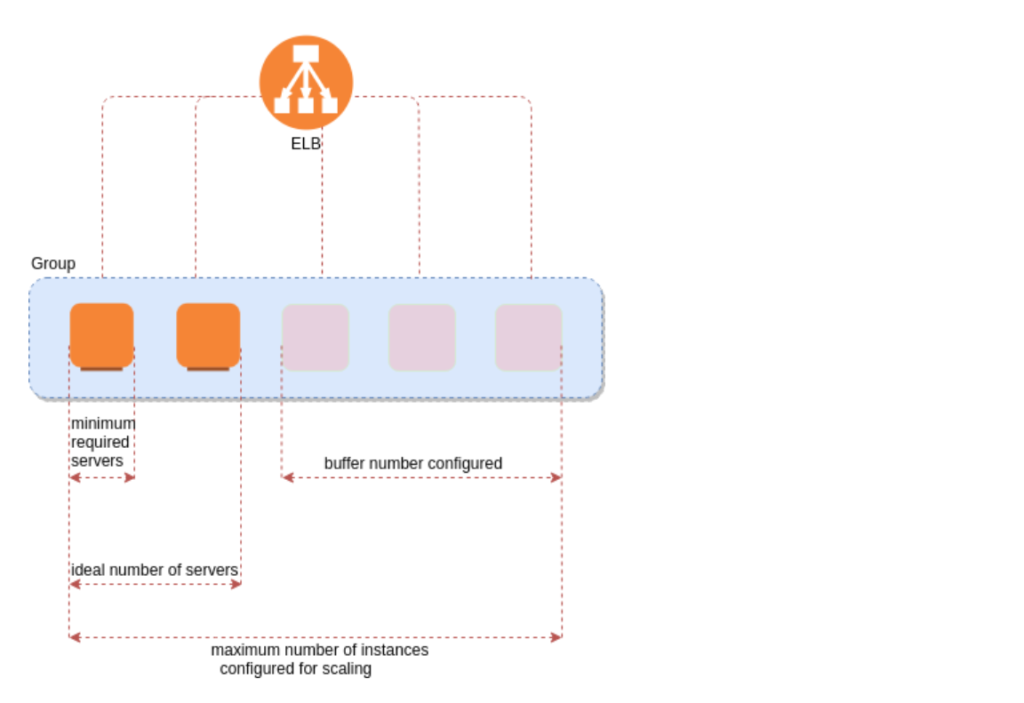
- We can attach one or more ELB to the ASG.
- The ELB must be in the same region.
- Once we configure this, any EC2 instance existing or added by the ASG will be automatically registered with the ASG defined ELB.
- While enabling ELB with ASG we always need to enable ELB health check as well, by default ASG uses EC2 health check option.
Healthcheck-
- Auto scaling by default classifies its EC2 instances status healthy or unhealthy with the help of EC2 status check.
- By default the health check grace period is 300 sec, this means once the instance is launched after that till 300 seconds there will be no health check, it’s not recommended to keep this value as 0 as, if this is kept zero once the instance is launched immediately it will start health check and we all know that it takes some time for the instance to get into “initialized state i.e 2/2 status”
- Until the grace period timer expires any unhealthy status reported won’t be acted upon by the ASG.
- Unlike rebalancing, here the termination of instances will happen 1st in case if its unhealthy, then the ASG attempts to launch new instances to replace the terminated one.
- The Elastic IP and EBS volume (additional) gets detached from the terminated instances, then we may need to manually attach them to new instances.
- Basic monitoring is enabled by default and is free of cost (300 sec).
- We can also make instances in stand by state manually in case we want to do any patch activity, the ASG will not do any health check on these machines, and there won’t be any load forwarded on this machine for that time period.
Auto Scaling Components –
- Launch Configuration:- We have to configure which type of instance we want, we can select the AMI, key pair, security group, instance type etc. Here once the Launch config is created we cannot edit the same. We can only delete or copy it.
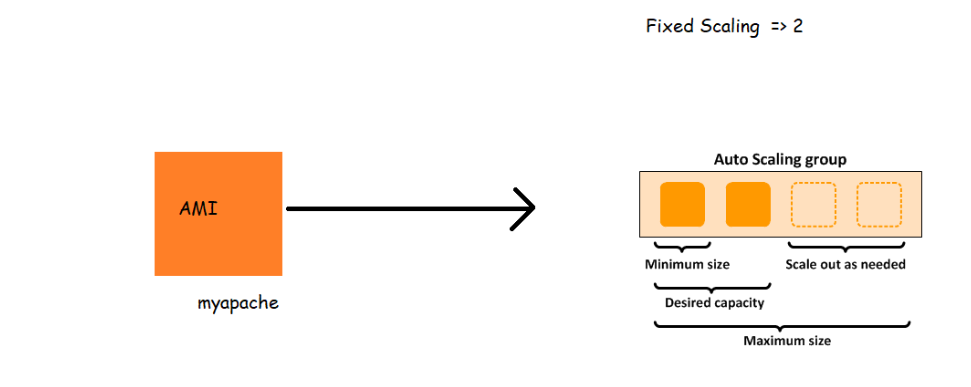
- Auto-Scaling Group:- We can select the Group Name, Group Size (Min instances, Max instances, desired instances), also the health check period which is 300 sec by default.
- Scaling policies
Warm up time of an instance:-
Instance warm-up defines the number of seconds it takes for a newly launched instance to warm up.
This prevents the ASG from adding more instances than needed. Before this launch, the instance warm-up time was set to a default value of 300 seconds.
Warm-up value for Instances allows you to control the time until a newly launched instance can contribute to the Cloud-Watch metrics, so when warm-up time has expired, an instance is considered to be a part Auto Scaling group and will receive traffic.
Cool down period:-
A cooldown period is a period of time after each scaling action is complete. During the cooldown period, scaling actions triggered by alarms will be denied.
The cooldown period is a configurable setting for your Auto Scaling group that helps to ensure that it doesn’t launch or terminate additional instances before the previous scaling activity takes effect
The amount of time to wait for a previous scaling activity to take effect is called the cooldown period.
Auto Scaling Policies
- Manual :- keep scaling policies same (as it is)
Here the values of min, max and desired will be the same and If I have to change this value then I need to do it manually.
- Dynamic:-
- Target tracking policy
- Simple scaling policy
- Step scaling policy
- Scheduled scaling policy
- Predictive scaling policy
Target Tracking Policy
- It helps to auto scale based on the metrics like Average CPU Utilization, Load balancer request per target, and so on. Simply stated it scales up and down the resources to keep the metric at a fixed value.
- For example, if the configured metric is Average CPU Utilization and the value is 60%, the Target Tracking Policy will launch more instances if the Average CPU Utilization goes beyond 60%. It will automatically scale down when the usage decreases. Target Tracking Policy works using a set of CloudWatch alarms which are automatically set when the policy is configured.
- One metric value set i.e 60 %
- AWS recommends to use Target Tracking policy for a metric like Average CPU utilization hence mostly this is used.
Simple Scaling
- Simple scaling relies on a metric as a basis for scaling.
- For example, you can set a Cloud Watch alarm to have a CPU Utilization threshold of 80%, and then set the scaling policy to add 20% more capacity to your Auto Scaling group by launching new instances.
- Accordingly, you can also set a Cloud Watch alarm to have a CPU utilization threshold of 30%. When the threshold is met, the Auto Scaling group will remove 20% of its capacity by terminating EC2 instances.
Step Scaling
- Step Scaling further improves the features of simple scaling.
- Step scaling applies “step adjustments” which means you can set multiple actions to vary the scaling depending on the size of the alarm breach.
More Policies-
- Scheduled scaling – Set a schedule for eg weekend load is high scale up etc.
- Predictive scaling – based on history and uses AI
AWS EC2 AutoScaling –
- Now we would want to increase/decrease number of ec2 instances in auto scaling group depending on some factors.
- So let’s try to increase ec2 instances when the load on CPU increases for this
- When CPU utilization > 80 % for 5 minutes lets increase one ec2 instance
- When CPU utilization < 40 % for 5 minutes lets decrease one ec2 instance
- Minimum ec2 instances => 1
- Max ec2 instances => 5
EC2 Auto Scaling:
- When AWS introduced the EC2 Auto Scaling service in 2009, it pioneered configurable scaling. As its name indicates, it focuses on the Amazon Elastic Compute Cloud (EC2) service, and it enables users to automatically launch and terminate EC2 instances based on configurable parameters.
- The most common use case in EC2 Auto Scaling is to configure CloudWatch alarms to launch new EC2 instances when a specific metric exceeds a threshold. For example, a developer could configure Auto Scaling to launch two EC2 instances when CPU utilization is greater than 50% for five consecutive minutes. Users also configure CloudWatch alarms to decrease the number of EC2 instances, for example, when CPU utilization falls to a value considered low usage.
- For certain applications, developers can also configure EC2 Auto Scaling to launch and terminate instances based on schedules. This is useful for known periods of low utilization such as nights or weekends.
AWS Auto Scaling
- AWS Auto Scaling, meanwhile, offers a centralized place to manage configurations for a wider range of scalable resources, such as EC2 instances, Amazon Elastic Container Service (ECS), Amazon DynamoDB tables or Amazon Relational Database Aurora read replicas.
- With AWS Auto Scaling, users can keep EC2 Auto Scaling groups within a configurable range of metrics. Developers can configure dynamic DynamoDB read/write capacity units for a specific table, also based on utilization. ECS services can be configured to launch or terminate ECS tasks based on CloudWatch metrics. The same applies to RDS read replicas; AWS Auto Scaling can add or terminate RDS read replicas based on utilization.
- AWS Auto Scaling introduced the concept of scaling plans, which use scaling strategies in order to manage resource utilization. Application owners can select a target utilization, such as CPU utilization at 50%, and AWS Auto Scaling will add or remove capacity to achieve that target.
Key differences in Amazon EC2 Auto Scaling vs. AWS Auto Scaling
- Overall, AWS Auto Scaling is a simplified option to scale multiple Amazon cloud services based on utilization targets. Amazon EC2 Auto Scaling focuses strictly on EC2 instances to enable developers to configure more detailed scaling behaviours.
- Another important distinction is that AWS Auto Scaling focuses on target utilization — for example, “Add a number of EC2 instances when a particular metric exceeds a threshold” — rather than let developers configure specific actions. Meanwhile, EC2 Auto Scaling relies on predictive scaling, which uses machine learning to determine the right amount of resource capacity necessary to maintain a target utilization for EC2 instances.
- While EC2 Auto Scaling provides more flexibility, AWS Auto Scaling delivers simplicity. The choice will come down to which features and capabilities are most relevant to the IT team and developers planning to scale the cloud environment.
