What is Kubernetes?
Kubernetes is an open-source container orchestration system for automating software deployment, scaling, and management. Google originally designed Kubernetes, but the Cloud Native Computing Foundation now maintains the project.
Cloud based K8S Services-
- GKE- Google kubernetes services
- AKS- Azure kubernetes services
- Amazon EKS( Elastic kubernetes services )
Kubernets Vs Docker Swarm
| FEATURES | KUBERNETES | DOCKER SWARM |
| Installation and cluster configuration | Complicated & time Consuming | Fast & Easy |
| Support | K8s Can work with almost all container types like Rocket, Docker, ContainerD | Work with Docker only |
| GUI | GUI Available | GUI not available |
| Data Volumes | Only shared with containers in same pod | Can be shared with any other Container |
| Update & Rollback | Process Scheduling to maintain services while updating | Progressive updates of services health monitoring throughout the update |
| Autoscaling | Support vertical & Horizontal Autoscalling | Not support Autoscalling |
| Logging & Monitoring | Inbuilt tool present for monitoring | Used 3rd party tools like Splunk |
Architecture:
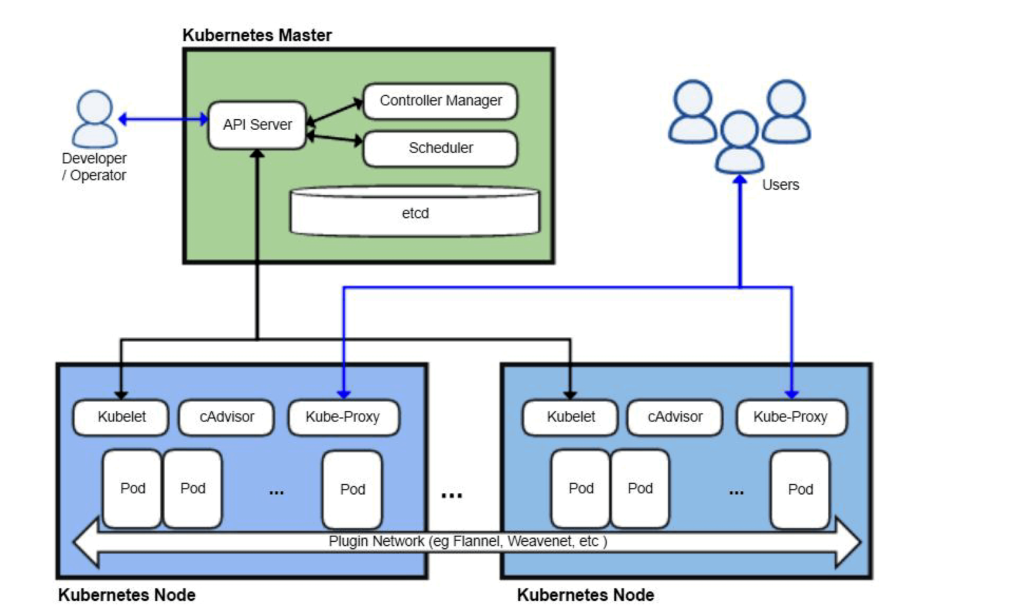
- Components of Kubernetes (k8s) cluster
- Control Plane Components
- The control plane components make decisions about the cluster
- Control plane can be run on any machine in the cluster
- We can create a highly available cluster by using multiple machines for control plane components
- The components are:
- kube-apiserver
- etcd
- kube-scheduler
- kube-controller-manager
- kube-cloud-controller-manager
- Node Components:
- They run on every node, maintaining running pods and providing k8s runtime environment.
- Our applications will be running on nodes
- The Node Components are
- kubelet
- kube-proxy
- Container runtime
- Kube-Apiserver:
- The API server is a component of k8s control plane that exposes k8s API (Front-end of k8s)
- All the communication between control plane and nodes is also handled by api server
- To make k8s HA (highly Available), we can horizontal scale api-server
- As a user of k8s cluster we can interact with kube-api server using API with json or a tool called a kubectl which is a command line tool
- etcd:
Is a strongly consistent, distributed key-value store that provides a reliable way to store data that needs to be accessed by a distributed system or cluster of machines. It gracefully handles leader elections during network partitions and can tolerate machine failure, even in the leader node.
- This is distribute key-value store.
- k8s uses etc to store all the cluster data
- kube-scheduler:
- Control plane component that creates Pods on the nodes by selecting them
- kube-controller-manager:
- Control plane component runs controller processes. Each controller is a separate process, but to reduce complexity they run in single process
- Some major types of controller are
- Node Controller: Responsible for noticing and responding when node goes down
- Job Controller
- Endpoints controller
- Cloud-controller-manager:
- This component embeds cloud-specific logic
- Kubelet:
- This is an agent that runs on each node in the cluster.
- Kubelet receives requests/orders to create new Pods
- kube-proxy:
- This is a network proxy that runs on each node in k8s
- This maintains network rules on the nodes
- Kube proxy is responsible for routing network traffic in the k8s cluster. To do this job, the proxy should be present on all the nodes in the cluster
- Container runtime:
- Kubernetes supports container run times such as contained, CRI-O and any implementation of Kubernetes CRI (Container Runtime instance)
- Basic Workflow
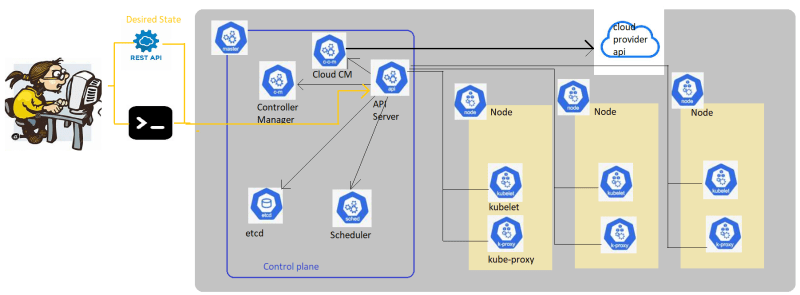
To interact with k8s cluster we have two major options
- programmatically by using REST API with json payloads
- kubectl command line by using YAML manifests
- When we interact with kubectl we create yaml manifest which has minimum details required where we express what we want rather than how it is done.
- when we work with clusters especially container clusters we embrace cattle mindset (pet vs cattle)
Pods in k8s
- A Pod is smallest unit of creation in k8s.
- Container will exist inside Pod.
- A Pod is collection of application containers and volumes running inside the same execution environment
- Each container in a pod runs with in its own cgroup, but they share a number of Linux namespaces
- Each Pod gets a unique IP address in k8s cluster. The containers running inside the Pod share the same IP Address and port space, have the same host name

- A Pod can have any number of containers, but ideally its not a good idea to run multiple containers in a Pod.
- A Pod should represent a microservice/application so running one container is considered as best idea.
Kubectl cheatsheet
kubectl has two primary commands to obtain information
- get
- describe
Pod:
- Smallest unit in kubernetes.
- Pod contains a container
- Pods can contain more than one container and the extra containers are referred as side-car containers
- Scaling the application in k8s is scaling pods not containers
- To create pods (anything) in k8s we have two approaches
- Imperative: we create objects using command line
- Declarative: We create manifests i.e. yaml files where we express what we want
- Imperative way of creating pods
#kubectl run –help
#kubectl run hello-pod –image jenkins/jenkins:lts-jdk11
#kubectl delete pods hello-pod
K8s Service
- K8s service when created gets a cluster ip which is virtual in nature, when any other resource tries to access the service using cluster ip it forwards to request to one of the pod matching labels
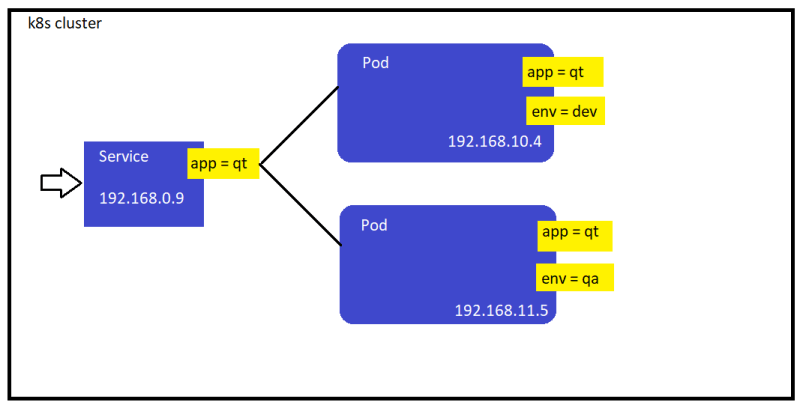
- An easier way to create the service is by using kubectl expose
- K8s service uses a label selectors which will find all the pods with matching labels and will load-balance across all the pods
- since the cluster ip is virtual, its stable and it is appropriate to give it a DNS address.
- K8s provides a DNS service exposed to Pods running in cluster.
- Lets create a K8s service Refer Here for the changes.
- Service should not forward the request to faulty pods, as this might impact application access, so lets see what can be done over here.
- Readiness Checks/Probes:
- This is to check whether the application in container running in Pod is ready to serve requests or not
- If this check fails the k8s removes the Ip address of Pods from all endpoints in Services
- Liveness Checks/Probes:
- This is to check whether or not application in container is running or not.
- K8s restarts containers if this check fails based on restart policy
- Refer Here for writing checks or probes
- Refer Here for the sample probes
- Accessing the service from outside cluster: For this in k8s service we have 3 options
- Node Port: Where you expose service on some port of the node
- Load Balancer Integration: Generally in all the managed clusters like AKS, EKS, GKE cluster is configured to integrate with external load balancers, so this can be used to expose the service
- External Name: Will be a DNS record which you can add to existing DNS servers
Kubernetes Deployment
- We know that Replica set manage pods.
- Deployment manages replica set.
- K8s is a self-healing system. The top level deployment object manages replica set, when you adjust number of replicas it will not match desired state so it will scale up or down
- Deployment allows us to deploy the newer versions of the applications by ensuring it supports all the necessary options to minimize/make zero down time deployments and rollout to a new version or roll back to the older version.
- Refer Here for the changeset & Refer Here for the fix for wrong indentation.
K8s Storage Solutions
- Volumes: k8s Volume has a lifecycle equal to Pod. Once the Pod is deleted, the data will be lost
- Persistent Volumes: These volumes have lifecylce independent of Pod, So data will not be lost
- To create Persistent Volumes, We have two options
- Manual Provisioning: In this case we need to manually create the storage to be used by the k8s cluster
- Dynamic Provisioning: In this K8s will try to automatically create the storage based on the details provided. We prefer this approach on clouds
- K8s has the following types of persistent volumes Refer Here
- In K8s Storage Class provides a way for administrators to describe the classes of storage.
- If you are using managed k8s, it will already have some storage classes defined
- aks
- eks
- In K8s, we need to understand the relation between storage classes, Persistent Volumes and Persistent Volume Claims
What is Persistent Volume Claim (PVC)
- PVC is request for platform to create a persitent volume (PV) and attach it to your pods.
- Storage classes define the details (hardware details(ssd/hdd/block/file))
Pod -> PVC -> PV -> Target Machine (Type of this is defined by SC)
- When we are using the volume to mounted on multiple pods Refer Here
- Refer Here for the changeset containing changes to create a PVC which create a PV of size 1 GB of type managed-premium
- Stateful Sets: For storage solutions, where each instance of the application in Pod requires its own private volume then, we go for stateful sets. Stateful sets use PVC to claim PV.
Helm
- Helm is a package-manager for k8s.
- When we want to create a package for our application, we create helm-chart.
