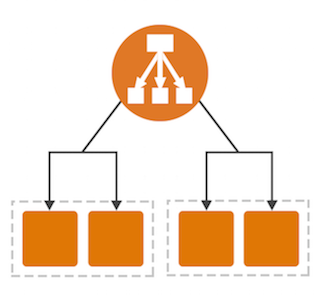
Elastic Load Balancing is the AWS service that automatically distributes incoming application traffic across multiple resources, such as Amazon EC2 instances.
A load balancer acts as a single point of contact for all incoming web traffic to your Auto Scaling group. This means that as you add or remove Amazon EC2 instances in response to the amount of incoming traffic, these requests route to the load balancer first. Then, the requests spread across multiple resources that will handle them. For example, if you have multiple Amazon EC2 instances, Elastic Load Balancing distributes the workload across the multiple instances so that no single instance has to carry the bulk of it.
Although Elastic Load Balancing and Amazon EC2 Auto Scaling are separate services, they work together to help ensure that applications running in Amazon EC2 can provide high performance and availability.
- A load balancer is a device that distributes network or application traffic across a number of servers.
- ELB distributes incoming traffic amongst various EC2 instances or available servers.
- ELB can distribute the load in between single AZ or multiple AZ
- ELB helps increase fault tolerance and makes sure there is high availability of the application 24*7.
How does it work?
- Load balancer checks on which server the traffic is less and accordingly forwards the request to the corresponding server.
- Incase any of the server is down it will move the request to any of the heathy server which is configured.
- Here we have to note that the load balancer will also do health checks on a regular time intervals and forward requests only to the healthy server.
- Usually load balancing is done together with auto-scaling, if any server is faulty then it gets replaced by a healthy server.
Types of load balancers
- Application load balancer
- Network load balancer
- Classic load balancer
- Gateway load balancer
Application load balancer-
- Application load balancer is used for mobile applications or web applications.
- ALB operates at the application layer of the OSI model, i.e. layer 7
- ALB is able to inspect application level content and route traffic based on HTTP and HTTPS protocol.
- Also ALB can route based on HTTP headers. For eg we want to access application which has a header /foo or /bar its possible
Application Load Balancer components-
- Load Balancers
- Listeners
- Target Groups
- Listener –
A listener is a process that checks for connection requests. It is configured with a protocol and a port for front-end (client to load balancer) connections, and a protocol and a port for back-end (load balancer to back-end instance) connections.
It listens to the incoming requests and forward requests accordingly.
- Target Group –
This is nothing but a cluster of EC2 instances. The ELB will only forward the traffic to EC2 instances which are part of target group.
- Target –
This is nothing but our individual EC2 instance, there is where we are going to target our traffic.
- Health checks –
This is done to check whether instance is healthy or not. ELB does some prior health checks before registering targets and forwarding traffic to it.
The following diagram illustrates the basic components. Notice that each listener contains a default rule, and one listener contains another rule that routes requests to a different target group. One target is registered with two target groups.
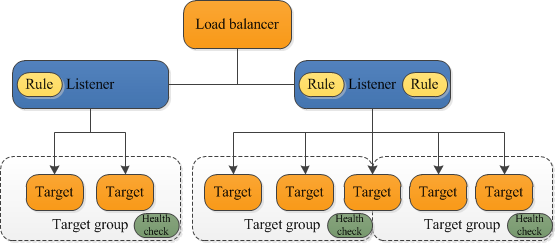
- A listener checks for connection requests from clients, using the protocol and port that you configure. The rules that you define for a listener determine how the load balancer routes requests to its registered targets.
- Each target group routes requests to one or more registered targets, such as EC2 instances, using the protocol and port number that you specify. You can register a target with multiple target groups. You can configure health checks on a per target group basis.
Benefits of migrating from a Classic Load Balancer-
- Support for path condition. You can configure rules for your listener that forward requests based on the URL in the request.
- Support for Host conditions. You can configure rules for your listener that forward requests based on the host field in the HTTP header.
- Support for registering targets by IP address, including targets outside the VPC for the load balancer.
- Support for redirecting requests from one URL to another.
- Support for registering Lambda functions as targets.
- Improved load balancer performance.
Network load balancer
- Network load balancer works on Layer 4 i.e is transport layer of OSI model.
- Basically network load balancer provides low latency (response time) and can manage heavy loads at a time.
- Network LB works on TCP/UDP/TLS protocols.
Difference between ALB & NLB-
- NLB just forward requests whereas ALB examines the contents of the HTTP request header to determine where to route the request.
- When you need to seamlessly support spiky or high-volume inbound TCP requests we use the network load balancer.
- ALBs are typically used for web applications. If you have a microservices architecture, etc
Difference between HTTP & TCP-
- HTTP typically uses port 80 – this is the port that the server “listens to” or expects to receive from a Web client. TCP doesn’t require a port to do its job.
- HTTP is faster in comparison to TCP as it operates at a higher speed and performs the process immediately. TCP is relatively slower.
- TCP tells the destination computer which application should receive data and ensures the proper delivery of said data, whereas HTTP is used to search and find the desired documents on the Internet.
- TCP contains information about what data has or has not been received yet, while HTTP contains specific instructions on how to read and process the data once it’s received.
- TCP manages the data stream, whereas HTTP describes what the data in the stream contains.
- TCP operates as a three-way communication protocol, while HTTP is a single-way protocol.
Classic Load Balancer –
- A Classic Load Balancer makes routing decisions at either the transport layer (TCP/SSL) or the application layer (HTTP/HTTPS).
- Classic Load Balancers currently require a fixed relationship between the load balancer port and the container instance.
- Classic load balancer is going to be discontinued by AWS
Gateway Load Balancers –
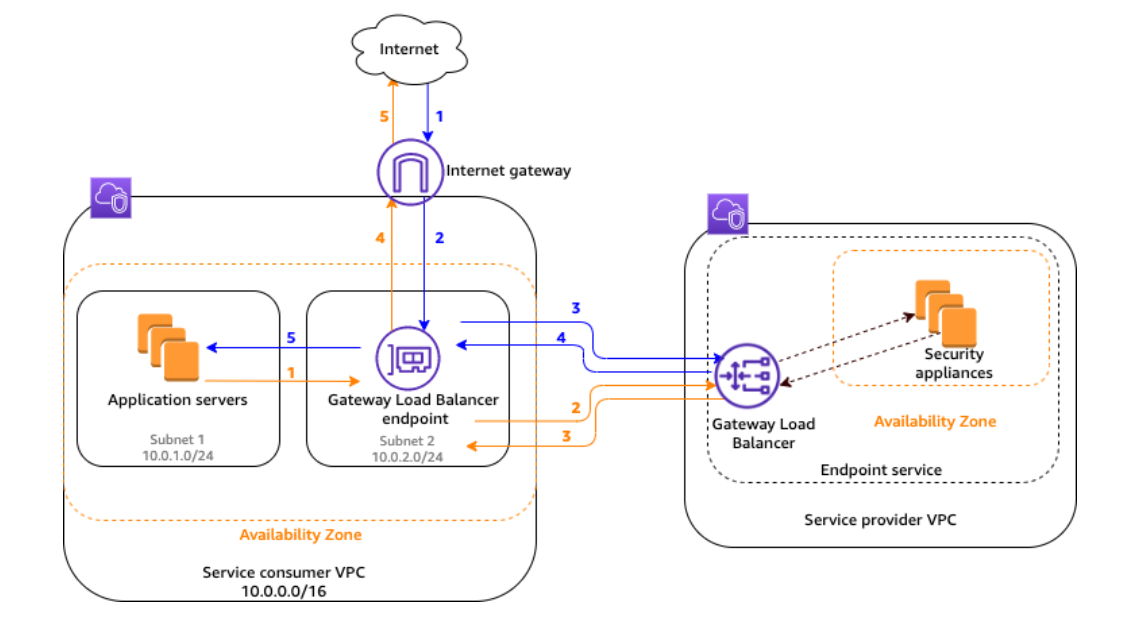
- Gateway Load Balancers allow you to deploy, scale, and manage virtual appliances, such as firewalls, intrusion detection and prevention systems, and deep packet inspection systems.
- It combines a transparent network gateway (that is, a single entry and exit point for all traffic) and distributes traffic while scaling your virtual appliances with the demand.
- A Gateway Load Balancer operates at the third layer of the Open Systems Interconnection (OSI) model, the network layer.
- It listens for all IP packets across all ports and forwards traffic to the target group that’s specified in the listener rule.
- It maintains stickiness of flows to a specific target appliance using 5-tuple (for TCP/UDP flows) or 3-tuple (for non-TCP/UDP flows).
- A Gateway Load Balancer endpoint is a VPC endpoint that provides private connectivity between virtual appliances in the service provider VPC and application servers in the service consumer VPC.