Question: What are Jenkins used for?
Answer: Jenkins is an open source continuous integration/continuous delivery and deployment (CI/CD) automation software DevOps tool written in the Java programming language. It is used to implement CI/CD workflows, called pipelines.
Jenkins can be installed through native system packages, Docker, or even run standalone by any machine with a Java Runtime Environment (JRE) installed.
Jenkins is a powerful application that allows continuous integration and continuous delivery of projects, regardless of the platform you are working on.
What is CI-CD?
- CI/CD is an important DevOps practice and an Agile methodology best practice.
- This practice allows development teams to frequently deliver and deploy applications and accelerate the application development process.
- Introducing a CI/CD pipeline into our software development lifecycle allows us to efficiently implement automation and monitor code changes, new features, potential bug fixes, and more.
- CI/CD typically refers to continuous integration and continuous delivery, but the “CD” can also stand for continuous deployment.
- Continuous delivery and continuous deployment both refer to automating stages of the CI/CD pipeline, but continuous deployment goes a step further.
- The purpose of continuous delivery is to make it easy to deploy new code.
- The purpose of continuous deployment is to allow teams to be “hands-off” in the process by automating the deployment stage.
Benefits Of CI –
- Increased Speed of delivery
- Real time feedback
- Easy maintenance
- Reliable
- Improved collaboration
- High quality code
CI
- Continuous integration refers to the build / integration stage of the software release process.
- It’s a stage where developers consistently merge their changes into the main repository of a version control system (like Git).
- After these changes are merged into the main repository, automated builds and tests are run.
- If you don’t run the tests yourself, the CI service performs automated tests and builds on any new code changes.
- Continuous integration is a coding philosophy and set of practices that drive development teams to implement small changes and check in code to version control repositories frequently.
- Continuous Integration is a software development method where team members integrate their work at least once a day. In this method, every integration is checked by an automated build to detect errors. This concept was first introduced over two decades ago to avoid “integration hell,” which happens when integration is put off till the end of a project.
- In Continuous Integration after a code commit, the software is built and tested immediately. In a large project with many developers, commits are made many times during a day. With each commit code is built and tested. If the test is passed, build is tested for deployment. If the deployment is a success, the code is pushed to Production. This commit, build, test, and deploy is a continuous process, and hence the name continuous integration/deployment.

Best practices of using CI Systems
Here, are some important best practices while implementing
- Commit Early and Commit Often never Commit Broken Code
- Fix build failures immediately
- Act on metrics
- Build-in every target environment Create artifacts from every build
- The build of the software need to be carried out in a manner so that it can be automated
- Do not depend on an IDE
- Build and test everything when it changes
- The database schema counts as everything
- Helps you to find out key metrics and track them visually
- Check-in often and early
- Stronger source code control
- Continuous integration is running unit tests whenever you commit code
- Automate the build and test everyone
- Keep the build fast with automated deployment
Disadvantages of CI
Here, are cons/drawbacks of Continuous Integration process:
- Initial setup time and training is required to get acquainted with Cl server
- Development of suitable test procedures is essential
- Well-developed test-suite required many resources for Cl server
- Conversion of familiar processes
- Requires additional servers and environments
- Waiting times may occur when multiple developers want to integrate their code around the same time.
CD
- Continuous delivery picks up where continuous integration ends.
- CD automates the delivery of applications to selected infrastructure environments.
- Most teams work with multiple environments other than the production, such as development and testing environments, and CD ensures there is an automated way to push code changes to them.
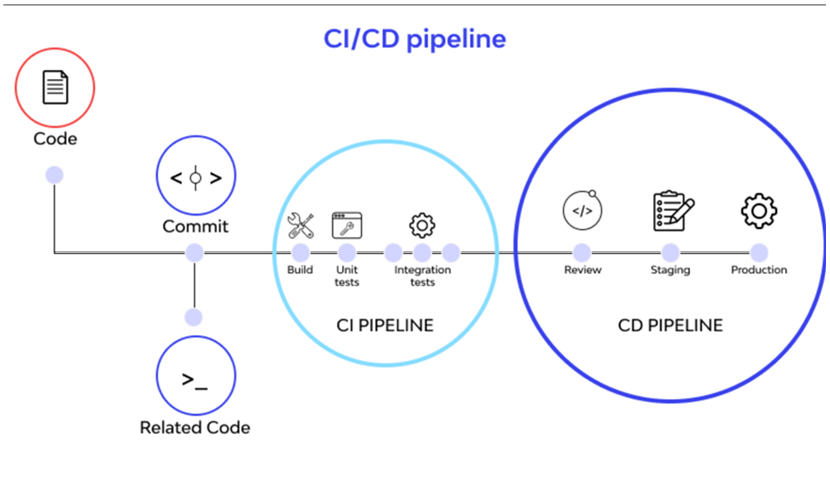
Jenkins is an open-source Continuous Integration server written in Java for orchestrating a chain of actions to achieve the Continuous Integration process in an automated fashion. Jenkins supports the complete development life cycle of software from building, testing, documenting the software, deploying, and other stages of the software development life cycle.
Jenkins is a widely used application around the world that has around 300k installations and growing day by day. By using Jenkins, software companies can accelerate their software development process, as Jenkins can automate build and test at a rapid rate.
As a Continuous Integration tool, Jenkins allows seamless, ongoing development, testing, and deployment of newly created code. Continuous Integration is a process wherein developers commit changes to source code from a shared repository, and all the changes to the source code are built continuously. This can occur multiple times daily. Each commit is continuously monitored by the CI Server, increasing the efficiency of code builds and verification. This removes the testers’ burdens, permitting quicker integration and fewer wasted resources.
- Jenkins is a self-contained, open source automation server which can be used to automate all sorts of tasks related to building, testing, and delivering or deploying software.
- Jenkins can be installed through native system packages, Docker, or even run standalone by any machine with a Java Runtime Environment (JRE) installed.
- Jenkins is a powerful application that allows continuous integration and continuous delivery of projects, regardless of the platform you are working on.
Jenkins Architecture:
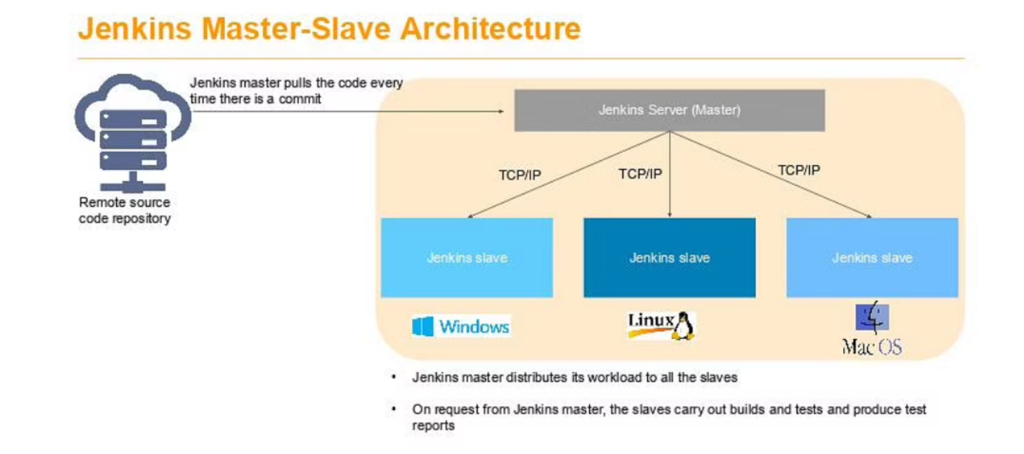
- Jenkins manages the builds with the help of master-slave architecture. Master and slave units communicate with each other using IP/TCP protocol. Here is a little download on how it all works.
Jenkins master
- This is the primary server of Jenkins.
- It handles a number of tasks that include but are not limited to scheduling build jobs, recording and presenting build results, dispatching builds to slaves for execution, monitoring all the slaves offline as well as online, and others.
- Master Jenkins is capable of directly executing build jobs.
Jenkins slave
- It runs on the remote server.
- The Jenkins server follows the requests of the Jenkins master and is compatible with all operating systems.
- Building jobs dispatched by the master are executed by the slave.
- The project can be suitably configured to choose a specific slave machine.
Jenkins -Master Connectivity
- Using the SSH method: Uses the ssh protocol to connect to the agent. The connection gets initiated from the Jenkins master. There should be connectivity over port 22 between master and agent.
- Using the JNLP method: Uses java JNLP protocol (Java Network Launch Protocol).
Features of Jenkins
- Easy installation and configuration
- Available plugins :- There are hundreds of plugins available in the Update Center, integrating with every tool in the CI and CD toolchain.
- Extensible :- Jenkins can be extended by means of its plugin architecture, providing nearly endless possibilities for what it can do.
- Easy distribution :- Jenkins can easily distribute work across multiple machines for faster builds, tests, and deployments across multiple platforms.
- Free Open Source :- Jenkins is an open-source resource backed by heavy community support.
Types of Jenkins build jobs:
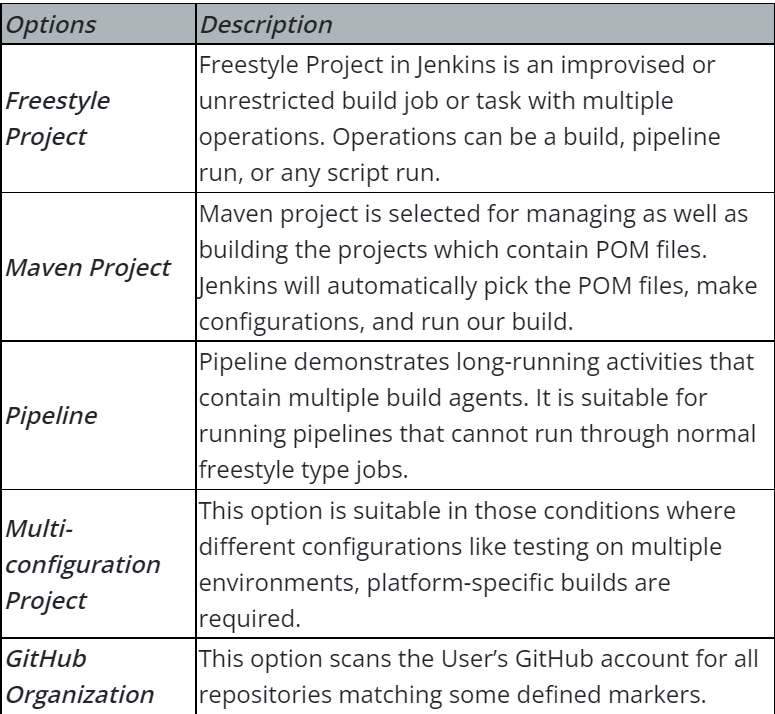
Jenkins Pipeline
- In Jenkins, a pipeline is a collection of events or jobs which are interlinked with one another in a sequence.
- The above diagram represents a pipeline in Jenkins. It contains a collection of states such as build, deploy, test and release.
- These jobs or events are interlinked with each other. Every state has its jobs, which work in a sequence called a continuous delivery pipeline.
Declarative pipeline vs Scripted Pipeline:
Declarative Pipeline:
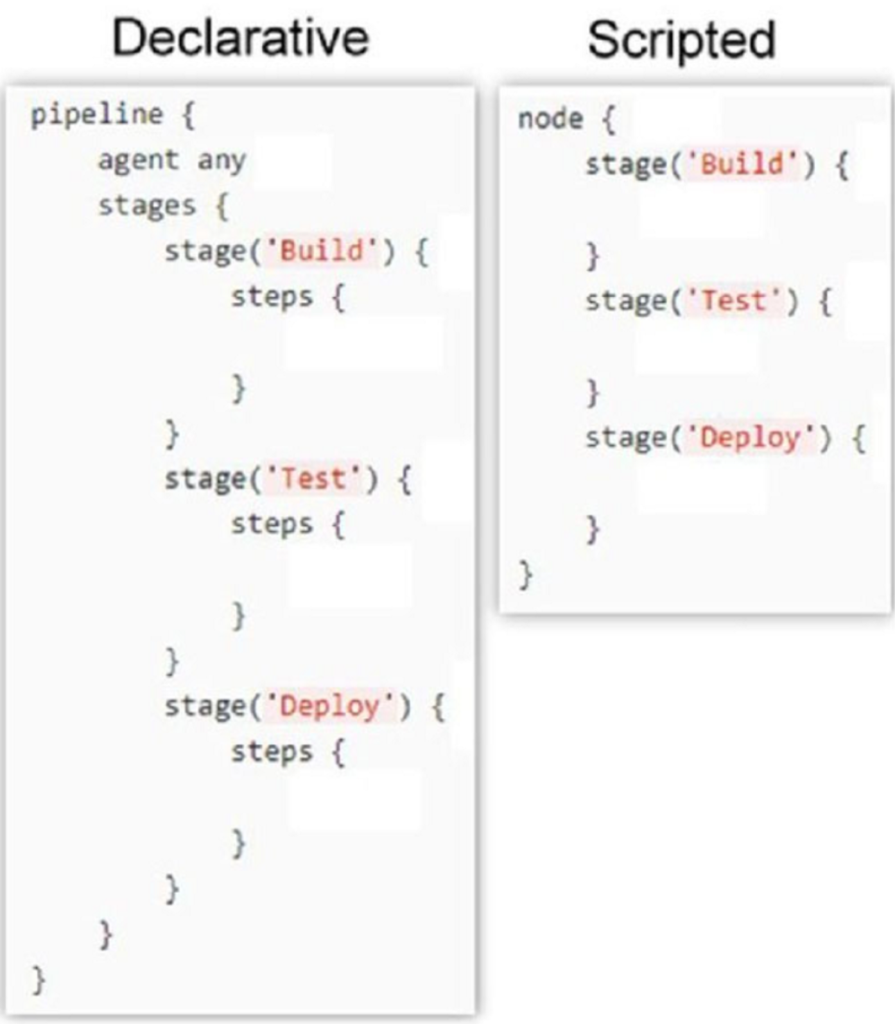
Declarative pipelines are a more recent approach to the “pipeline-as-code” principle. They are quite easy to write and understand. The structure may seem to be a bit complex, but overall, it contains only a couple of basic sections. The “pipeline” block is the main block that contains the entire declaration of a pipeline. In this example, we’ll consider only “agent”, “stages”, and “steps” sections:
- pipeline – contains the whole pipeline
- agent – defines the machine that will handle this pipeline
- stages – declares the stages of the pipeline
- steps – small operations inside a particular stage
- Another important part of declarative pipelines is directives. In fact, directives are a convenient way to include additional logic. They can help to include tools into a pipeline and can also help with setting triggers, environment variables, and parameters. Some directives can prompt users to input additional information. There’s an easy-to-use generator that can help with creating these directives.
- In the previous example, “steps” is a directive that contains the logic that will be executed in the stage. There’s a dedicated snippet generator that provides a convenient way of creating steps.
- The power of declarative pipelines comes mostly from directives. Declarative pipelines can leverage the power of scripted pipelines by using the “script” directive. This directive will execute the lines inside as a scripted pipeline.
Scripted Pipeline–
Scripted pipelines were the first version of the “pipeline-as-code” principle. They were designed as a DSL build with Groovy and provide an outstanding level of power and flexibility. However, this also requires some basic knowledge of Groovy, which sometimes isn’t desirable.
- These kinds of pipelines have fewer restrictions on the structure. Also, they have only two basic blocks: “node” and “stage”. A “node” block specifies the machine that executes a particular pipeline, whereas the “stage” blocks are used to group steps that, when taken together, represent a separate operation. The lack of additional rules and blocks makes these pipelines quite simple to understand:
- Think about scripted pipelines as declarative pipelines but only with stages. The “node” block in this case plays the role of both the “pipeline” block and the “agent” directive from declarative pipelines.
- As mentioned above, steps for the scripted pipelines can be generated with the same snippet generator. Because this type of pipeline doesn’t contain directives, steps contain all the logic. For very simple pipelines, this can reduce the overall code.
- However, it may require additional code for some boilerplate setups, which can be resolved with directives. More complex logic in such pipelines is usually implemented in Groovy.
Jenkins Plugins:
- Plugins are the primary means of enhancing the functionality of a Jenkins environment to suit organization- or user-specific needs. There are over a thousand different plugins which can be installed on a Jenkins controller and to integrate various build tools, cloud providers, analysis tools, and much more.
- Plugins can be automatically downloaded, with their dependencies, from the Update Center. The Update Center is a service operated by the Jenkins project which provides an inventory of open source plugins which have been developed and maintained by various members of the Jenkins community.
Build Triggers:
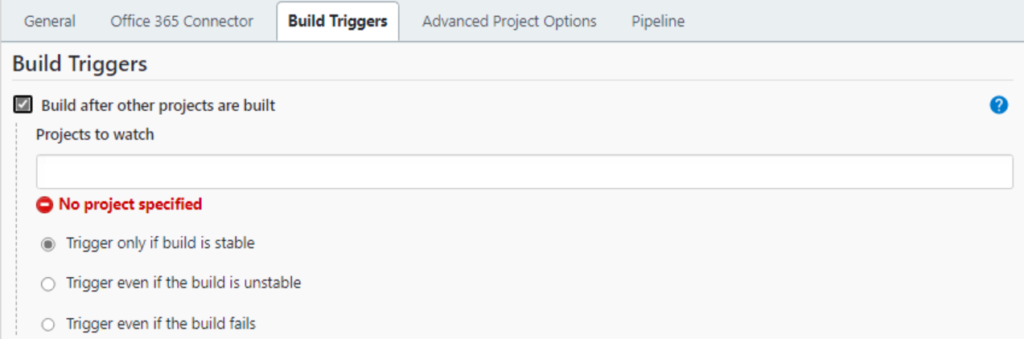
- Build after other projects are built –
If your project depends on another project build then you should select Build after other projects are built option from the build triggers.
In this, you must specify the project(Job) names in the Projects to watch field section and select one of the following options:
| 1. Trigger only if the build is stable Note: A build is stable if it was built successfully and no publisher reports it as unstable |
| 2. Trigger even if the build is unstable Note: A build is unstable if it was built successfully and one or more publishers report it unstable |
| 3. Trigger even if the build fails |
After that, It starts watching the specified projects in the Projects to watch section.
Whenever the build of the specified project completes (either is stable, unstable or failed according to your selected option) then this project build invokes.
- Build Periodically –
If you want to schedule your project build periodically then you should select the Build periodically option from the build triggers.
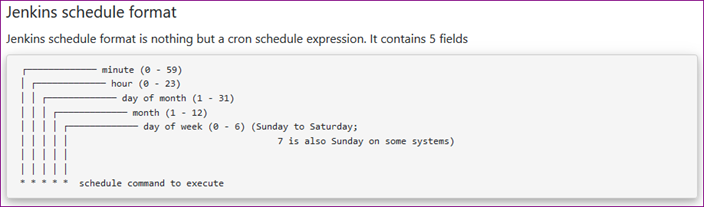
You must specify the periodical duration of the project build in the scheduler field section.
This field follows the syntax of cron (with minor differences). Specifically, each line consists of 5 fields separated by TAB or whitespace: * * * * *
For example –
@hourly –> Build every hour at the beginning of the hour –> 0 * * * *
@daily, @midnight –> Build every day at midnight –> 0 0 * * *
@weekly –> Build every week at midnight on Sunday morning –> 0 0 * * 0
@monthly –> Build every month at midnight of the first day of the month –> 0 0 1 * *
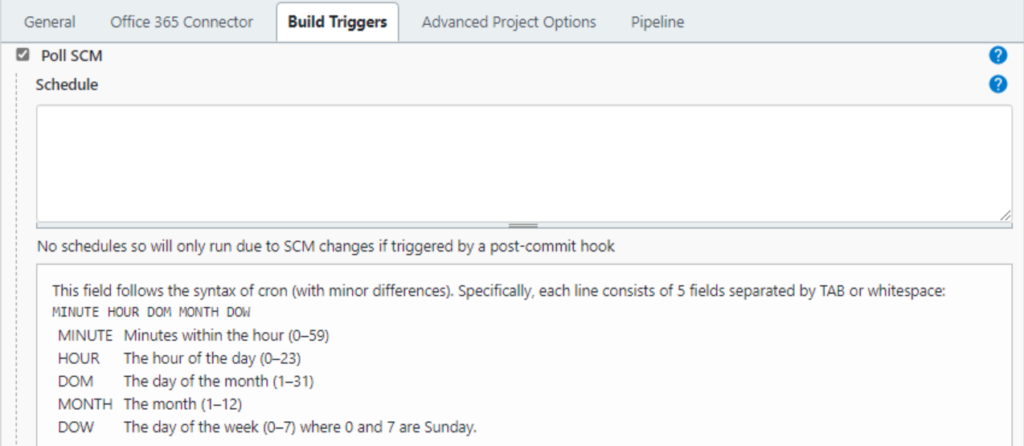
- Poll SCM:
Poll SCM periodically polls the SCM to check whether changes were made (i.e. new commits) and builds the project if new commits were pushed since the last build.
You must schedule the polling duration in the scheduler field. Like we explained above in the Build periodically section. You can see the Build periodically section to know how to schedule.
After successfully scheduled, the scheduler polls the SCM according to your specified duration in scheduler field and builds the project if new commits were pushed since the last build.
- GitHub webhook trigger for GIT SCM polling:
A webhook is an HTTP call back, an HTTP POST that occurs when something happens through a simple event-notification via HTTP POST.
GitHub webhooks in Jenkins are used to trigger the build whenever a developer commits something to the branch.
Let’s see how to add build a webhook in GitHub and then add this webhook in Jenkins.
- Go to your project repository.
- Go to “settings” in the right corner.
- Click on “webhooks.”
- Click “Add webhooks.”
- Write the Payload URL as
- Github Pull request –
Trigger that integrates with GitHub Pull Requests and Issues activities and launches runs in response.
- Trigger Build remotely:
This option is used when we want to trigger new builds by accessing a special predefined URL.
