- Object storage is a computer data storage architecture that manages data as objects, as opposed to other storage architectures like file systems which manages data as a file hierarchy, and block storage which manages data as blocks
What is S3 in AWS?
- Amazon S3 or Amazon Simple Storage Service is a service offered by AWS that provides object storage through a web service interface.
- This is similar to google drive but more advanced for technical people.
- This is not like block storage we cannot mount anywhere.
- It’s a only drive we do not need to create any file system.
- It is designed to make web-scale computing easier for IT people.
- Basically, s3 is storage for the internet which has a simple webservices interface for simple storing and retrieving data anytime or from anywhere on the internet.
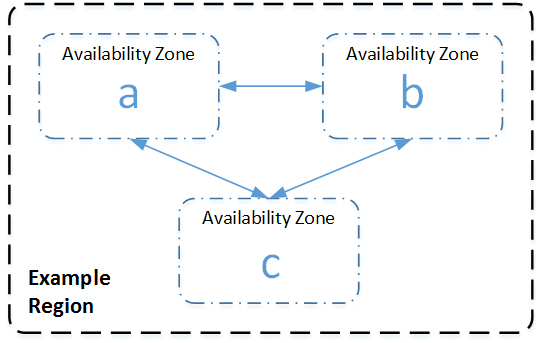
- S3 has a distributed data-size architecture where objects are redundantly stored in multiple locations (min 3 zones).
Advantages-
- Reliable Security
- All-time Availability
- Very Low cost
- Ease of Migration
- The Simplicity of Management
Distributed architecture-
- An AWS Availability Zone is a physically isolated location within an AWS Region. Within each AWS Region, S3 operates in a minimum of three AZs, each separated by miles to protect against local events like fires, power down, etc.
S3 concepts –
- Buckets
- Keys
- Objects
- S3 bucket resources
- S3 storage classes
Buckets/Keys/Objects –
- An Amazon S3 bucket is a public cloud storage resource available in Amazon Web Services’ (AWS) Simple Storage Service (S3), an object storage offering.
- Amazon S3 buckets, which are similar to file folders, store objects, which consist of data.
- Data is stored inside a bucket.
- Bucket is nothing but a flat container of objects
- Individual Amazon S3 objects can range in size from 1 byte to 5 terabytes.
- The largest object that can be uploaded in a single PUT is 5 gigabytes. For objects larger than 100 megabytes, customers should consider using the Multipart Upload capability.
- There is no limit on objects per bucket.
- You can create or upload multiple folders in one bucket but you cannot create a bucket inside a bucket (Nested bucket not possible)
- S3 bucket is region specific.
- You can have 100 buckets per account, this number can be increased.
- By default buckets and its objects are private, thus by default only the owner can access the buckets.
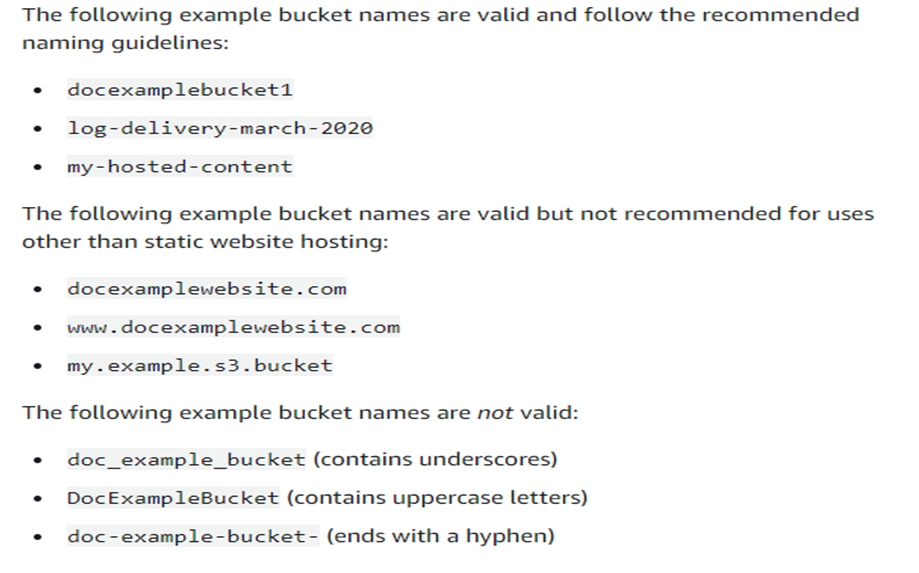
- There are some naming rules while creating a s3 bucket.
- A S3 bucket name should be globally unique across all the regions and accounts.
- Bucket names must be between 3 and 63 characters long.
- Bucket names can consist only of lowercase letters, numbers, dots (.), and hyphens (-).
- Bucket names must begin and end with a letter or number.
- Bucket names must not be formatted as an IP address (for example, 192.168.5.4).
url –
https://docs.aws.amazon.com/AmazonS3/latest/userguide/bucketnamingrules.html

S3 sub resources-
- Lifecycle
- Website
- Versioning
- Access control lists
S3 object lifecycle-
- A lifecycle configuration is a set of rules that are applied to the objects in specific S3 buckets.
- Each rule specifies which objects are affected and when those objects will expire (on a specific date or after some number of days).
Website-
- You can use Amazon S3 to host a static website. On a static website, individual webpages include static content.
- When you configure a bucket as a static website, you must enable static website hosting, configure an index document, and set permissions.
- You can enable static website hosting using the Amazon S3 console, REST API, the AWS SDKs, the AWS CLI, or AWS CloudFormation.
- Configuring a static website using a custom domain registered with Route 53
Versioning-
- Versioning in Amazon S3 is a means of keeping multiple variants of an object in the same bucket.
- You can use the S3 Versioning feature to preserve, retrieve, and restore every version of every object stored in your buckets.
- With versioning you can recover more easily from both unintended user actions and application failures.
- Versioning-enabled buckets can help you recover objects from accidental deletion or overwrite
- For example, if you delete an object, Amazon S3 inserts a delete marker instead of removing the object permanently.
- The delete marker becomes the current object version.
- You can still recover the object by deleting the delete marker.
- This versioning is incremental versioning.
- You can use versioning with S3 lifecycle policy to delete older versions to move them to cheaper s3 versions.
- Versioning can be applied to all objects in a bucket, not partially applied
Access Control Lists-
- Amazon S3 access control lists (ACLs) enable you to manage access to buckets and objects.
- Each bucket and object has an ACL attached to it as a subresource.
- It defines which AWS accounts or groups are granted access and the type of access.
- When a request is received against a resource, Amazon S3 checks the corresponding ACL to verify that the requester has the necessary access permissions.
- https://docs.aws.amazon.com/AmazonS3/latest/userguide/acl-overview.html
MFA delete in S3 bucket-
- Multifactor authentication delete is a versioning capacity that adds another level of security in case your account is compromised.
- This adds another layer of security for the following
- Changing your bucket versioning state or permanently deleting an object version
AWS S3 Storage Classes
S3 offers a variety of storage class designs to cater to different usecases.You can choose the appropriate storage class & also move objects from one storage class to other.
- Amazon s3 standard
- Amazon glacier deep archive
- Amazon glacier
- Amazon s3 infrequent access (standard IA)
- Amazon s3 one-zone IA
- Amazon S3 intelligent tiering
- Theory Link:- https://aws.amazon.com/s3/storage-classes/
- Pricing link:- https://aws.amazon.com/s3/pricing/
Storage Classes
- S3 Standard:
- This is default storage classes.
- It offers HA (high availability), durability and performance
- In this storage class, you pay more for storage and less for accessing
- When we use S3 the files in S3 standard are synchronously copied across three facilities and designed to sustain the loss of data in two facilities
- Durability is 99.999999999%
- Designed for 99.99% availability over a given year.
- Largest object that can be uploaded in a single PUT is 5TB.
- S3 Standard Infrequent access:
- Designed for the objects that are accessed less frequently i.e. paying more for access and less for storage
- Resilient against events that impact an entire AZ.
- Availability is 99.9% in year.
- Support SSL for data in transit and encryption of data at rest.
- Data that is deleted from S3 IA within 30 days will be charged for a full 30 days.
- S3 One Zone infrequent access:
- In this data is stored only in one AZ when compared to S3 Standard/S3 standard infrequent access where the data is copied in 3 AZ’s
- Storage cost is less and access cost is high.
- Ideal for those who want lower cost option of IA data.
- It is good choice for storing secondary backup copies of one premise data or easily re-creatable data.
- You can use S3 lifecycle policies.
- Availability is 99.5%
- Durability is 99.999999999%
- Because S3 zone-IA stores data in a single is it data stored in this storage class will be lost in the event of AZ destructions.
- S3 Intelligent-Tiering:
- Designed to optimize costs by automatically moving the data from one storage class to another based on access patterns.
- It works by storing object into access tiers.
- If an object in the infrequent access tire is it automatically moved back to frequent access tier.
- There are no retrieval fees when using S3 intelligent tiering storage class and no additional tiering fee when objects are moved between access tiers.
- Same low latency and high performance of S3 standard.
- Object less than 128 KB cannot move to IA.
- Durability is 99.999999999%
- Availability is 99.9%
- S3 Glacier:
- S3 Glacier is secure durable low cost storage class for data archiving.
- To keep cost low yet suitable for wearing needs S3 Glacier provides 3 retrieval options that range from a few minute to hours.
- You can upload object directly to Glacier or use lifecycle policies.
- Durability is 99.999999999%
- Data is resilient in the event of one entire AZ destructions.
- Support SSL for data in transit and encryption data at rest.
- S3 Glacier Deep Archive:
- This is used for long-term archival storage (compliance reasons)
- You may be accessing this data hardly once or twice a year.
- Glacier Deep archive is the ideal solution for replacement of tape storage
- With S3 Glacier Deep Archive, Data can be restore within 12 hours
- Design to retain data for long period eg..10 years.
- All object store in S3 Glacier deep achieve are replicated and told across at least at three geographically depressed AZ.
- Durability is 99.999999999%
- Storage cost is up to 75% less than for the existing S3 Glacier storage class.
- Availability is 99.9%
| Characteristic | S3 Standard | S3 Intelligent Tiering | S3 IA | S3 One-Zone IA | S3 Glacier | S3 Glacier Deep Archive |
| Designed for Durability | 100.00% | 100.00% | 100.00% | 100.00% | 100.00% | 100.00% |
| Designed for Availability | 99.99% | 99.90% | 99.90% | 99.50% | 99.99% | 99.99% |
| Availability SLA | 99.90% | 99% | 99% | 99% | 99.90% | 99.90% |
| AZs | >= 3 | >=3 | >=3 | 1 | >=3 | >=3 |
| Min charge/object | N/A | N/A | 128 KB | 128 KB | 40 KB | 40 KB |
| Min storage duration cache | N/A | 30 days | 30 days | 30 days | 90 days | 90 days |
| Retrieval fee | N/A | N/A | per GB retreived | per GB retreived | per GB retreived | per GB retreived |
| First byte latency | milli seconds | milli seconds | milli seconds | milli seconds | minutes or Hours | hours |
Versioning:
- By default aws will try to show the latest object, if we need to maintain multiple versions of the object then we need to enable versioning
- After enabling the versioning, each object gets the version id and default url will point to latest version
S3 supports enable versioning and suspend versioning.
Bucket Deletion
- S3 bucket deletion requires the bucket to be empty before deleting.
Policies and Permissions in Amazon S3:
In its most basic sense, a policy contains the following elements:
- Resources– Buckets, objects, access points, and jobs are the Amazon S3 resources for which you can allow or deny permissions. In a policy, you use the Amazon Resource Name (ARN) to identify the resource. For more information, see Amazon S3 resources.
- Actions– For each resource, Amazon S3 supports a set of operations. You identify resource operations that you will allow (or deny) by using action keywords.
For example, the s3:ListBucket permission allows the user to use the Amazon S3 GET Bucket (List Objects)operation. For more information about using Amazon S3 actions, see Amazon S3 actions. For a complete list of Amazon S3 actions, see Actions. - Effect– What the effect will be when the user requests the specific action—this can be either allow or deny.
If you do not explicitly grant access to (allow) a resource, access is implicitly denied. You can also explicitly deny access to a resource. You might do this to make sure that a user can’t access the resource, even if a different policy grants access. For more information, see IAM JSON Policy Elements: Effect. - Principal– The account or user who is allowed access to the actions and resources in the statement. In a bucket policy, the principal is the user, account, service, or other entity that is the recipient of this permission. For more information, see Principals.
- Condition– Conditions for when a policy is in effect. You can use AWS‐wide keys and Amazon S3‐specific keys to specify conditions in an Amazon S3 access policy. For more information, see Amazon S3 condition key examples.
S3 Naming –